
New here? Start with Part 1: 30 Hours, One Laptop, and a Scam-Call Detector. It's the story of my first hackathon, CT BuildFest 2.0, where my team won second place with Veracity.
Part 1 was about the 30 hours: the team, the long night, the evaluation and the trophy. It barely touched how Veracity actually works. This part is the build itself: why it exists, how it fits together, and the decisions behind each piece.
At the end of Part 1, I promised you lessons and mistakes. They're still coming, in Part 3. Once I started writing them down, I realised most of them only make sense after you've seen what I built. So first, the machine.
Why Veracity exists
A cloned voice is cheap to make. McAfee's researchers found that three seconds of someone's audio was enough for a clone with an 85% voice match. In their survey of 7,000 people, 70% weren't confident they could tell a clone from the real voice.
The losses are now big enough to get their own line in official reports. The FBI's 2025 Internet Crime Report counted 22,364 complaints that involved AI, with about $893 million lost. That includes "distress scams": a cloned voice of a family member calls in a crisis and asks for money.
When I looked at how people are protected from these calls, I kept finding the same gap. Protection works before the call, as a "spam likely" label on a number. Or it works after the call, as a complaint once the money is gone. The scam happens in between: a few panicked minutes on the phone while you decide whether to send the money.
Veracity is built for those few minutes.
The core idea: three signals, one verdict
A scam call usually gives itself away in three places:
- The number. Is it valid? Is it international? Has anyone reported it?
- The voice. Is it a real person, or generated by AI?
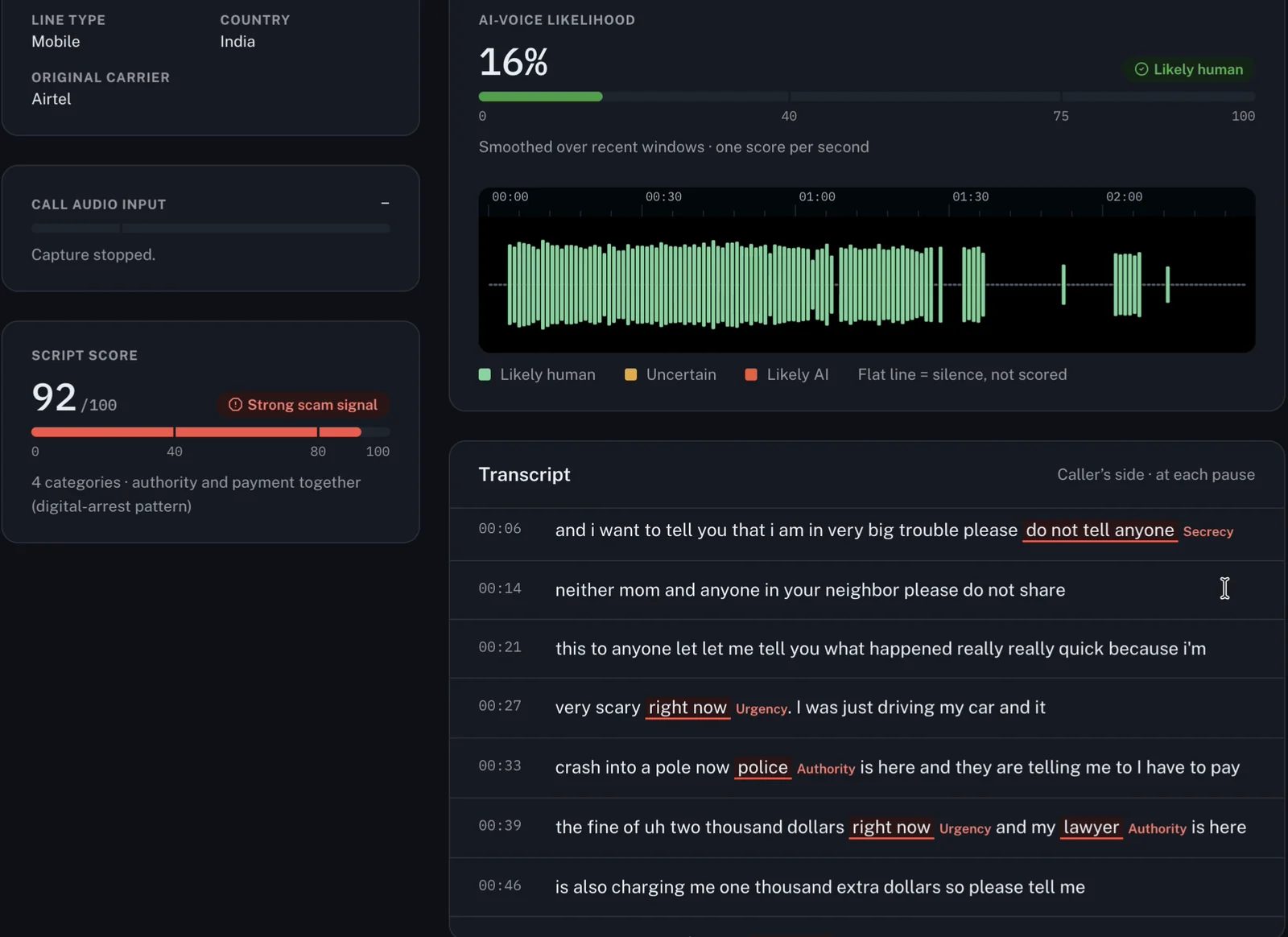
- The words. Do they follow a script, like police, a lawyer, "don't tell anyone" or "send it right now"?
No single signal is reliable on its own. A real person can read a scam script in their own voice. A scammer can call from an ordinary-looking number. And your real cousin can ask you for money. So Veracity listens to all three at once, while the call is still going on, and combines them into one risk score with reasons you can read.
Two rules shaped every decision after that:
- It runs on the laptop. The call is analysed in memory on your own machine and isn't uploaded anywhere. That's a privacy decision, and also a hackathon one: a demo that depends on someone else's server can die on stage.
- Every verdict comes with evidence. Not "this feels like a scam", but the caller's exact words, the second they said them, and how each score was built. People ignore a warning that can't explain itself.
The architecture at a glance
Here is the whole path, from the phone in your hand to the verdict on the screen:
Android phone, on a real call
  │ USB cable: adb + scrcpy pull the caller's voice
  ▼
Mac sound output → BlackHole (a virtual microphone)
  │ 0.1 s blocks, resampled to mono 16 kHz
  ▼
FastAPI backend, on the laptop
  │
  ├── Number  libphonenumber + a rule score
  ├── Voice   AI-voice model, 4 s window every 1 s
  ├── Words   Whisper → scam rules → local LLM
  │
  ▼
Risk fusion: one score, with reasons
  │ WebSocket events
  ▼
React dashboard: live alerts, then an evidence report
  │ added for the PayPal AI Hackathon
  ▼
Payment gate → PayPal: hold, release or void
There are two programs. The backend (Python, FastAPI) does the real work: it captures the audio, runs the models and keeps the scores. The dashboard (React, Vite) only draws what the backend sends it, over a WebSocket, as it happens. It walks you through four screens: check the setup, check the number, the live call, and the report.
Step zero: getting the call audio at all
The hardest problem in Veracity had nothing to do with AI. It was getting the sound of a phone call into Python.
Android doesn't let ordinary apps record calls, so I didn't write an app. Veracity uses scrcpy, an open-source tool that mirrors an Android phone to a computer over USB. scrcpy runs its capture code on the phone through adb, and since version 3.2 it can capture the caller's side of a call (its voice-call-downlink source).
scrcpy plays that audio on the Mac. To get it into Python, the Mac's sound output is set to a Multi-Output Device: your speakers plus BlackHole, a virtual audio driver. Python then reads BlackHole as if it were a microphone, in 0.1-second blocks, and turns them into mono 16 kHz audio, which is what the speech models expect.
The backend also watches the phone itself. It reads the call state over adb (dumpsys telephony.registry), so the dashboard notices when the phone rings and fills in the caller's number when Android shares it. No app has to be installed on the phone.
Is a USB cable a real product? No. A shipped version would need the phone maker or the network on board. But the cable proves the whole pipeline end to end, on a real call, today.
Signal 1: the number
The number check is the simplest layer, and it's boring on purpose. It uses libphonenumber, the Python version of Google's phone-number library, which works fully offline. From the number alone it works out whether it's valid, its type (mobile, landline, toll-free), the country, the region and the carrier it was first issued to.
Then a transparent rule score adds points, each with a reason you can read:
| Signal | Points |
|---|---|
| Not a valid number | +40 |
| International number | +25 |
| Reported by the community (more reports, more points) | up to +30 |
| A report in the last 7 days | +10 |
| India's 140 telemarketing series | +5 |
| India's 1600 series, used only by regulated banks and agencies | −20 |
I'd planned a machine-learning model on the digits, and the report still has an empty slot for it. But digits alone carry very little signal, and a rule you can explain beats a model you can't. There's also one thing this layer can never do: unmask a spoofed number. It checks the caller ID the network shows you, nothing more.
Signal 2: the voice
Every second, Veracity takes the last 4 seconds of the caller's audio and asks an AI-voice model one question: how likely is it that this speech was generated? It skips silence, and it waits until it has 3 seconds of speech. A shorter clip has to be repeated to fill the model's 4-second window, and that repetition sounds synthetic to the model.
One window on its own is noisy, so the scores are smoothed with a moving average. The verdict only turns Likely AI after three windows in a row score 0.75 or more. Once a call has been Likely AI, it stays flagged, even if a real person speaks afterwards.
At BuildFest the model was a wav2vec2 deepfake classifier. While preparing for the PayPal hackathon, I tested it on speech from newer generators like Google Veo and ElevenLabs, and it called most of them human. So I replaced it with Spectra-0, an anti-spoofing network built on XLS-R. I tested it on 40 minutes of AI speech and 81 minutes of real people, all pushed through simulated phone lines. It flagged 85% of the AI calls (the old model caught 39%) and 1.1% of the real people.
That testing also exposed a bug in my audio code. I was resampling every 0.1-second block on its own, which put a tiny click at each block edge, and those clicks were enough to throw the model off. The audio is now resampled as one continuous stream.
And the honest limit: an AI voice played from a speaker across a room is mostly missed (19% caught). The room's echo hides what the model listens for.
Signal 3: the words
The transcript comes from Whisper large-v3-turbo, through faster-whisper, running on the laptop's CPU. The audio goes to it in chunks of 6 to 12 seconds, cut at the next pause where there is one, so words don't get split between two chunks.
Hindi on phone audio is rough for Whisper, so I tuned it. The language is set instead of detected, because auto-detection picked Romanian and German on real calls. The temperature stays near zero, so unclear audio doesn't turn into word salad. And repeated three-word phrases are blocked, so it can't get stuck in a loop.
Then two layers read the text.
Layer 1: scam rules. These are plain regular expressions in 12 categories, in English, Hinglish and Hindi: OTP and PIN requests, police and officials, arrest threats, payment pressure, remote-access apps, secrecy, KYC and blocked accounts, parcels, family emergencies, prizes, urgency, and identity claims like "it's me, your grandson" (the 12th, added for the PayPal version). Whisper often misspells Hindi words on phone audio, so before matching, both the text and the patterns are "folded": letters Whisper mixes up become one letter. The evidence shown to you is still cut from the original words.
Each category has a severity, and the script score adds them up. Some combinations get a bonus, because together they are the shape of a known scam: police plus payment pressure (the "digital arrest" scam), a family emergency plus payment, or "it's me" plus payment.
Layer 2: a local LLM. About every 16 seconds, Llama 3.1 8B (through Ollama) reads the transcript so far and answers in a fixed JSON schema: is it a scam, what type, and red flags, each with the caller's exact quote. It runs on its own thread, so a slow answer never holds up the transcript.
This is the rule I'm proudest of: a flag from the LLM is kept only if its quote really appears in one line of the transcript. The LLM can point at evidence. It can't invent it. And if Ollama isn't running, the rules carry on alone.
Fusion: one strong signal is enough
Three scores from 0 to 100 have to become one verdict. The obvious way is a weighted average, and that's where Veracity starts:
WEIGHTS = {"number": 0.25, "voice": 0.40, "script": 0.35}
VOICE_ALONE = 85   # a voice peak this high is enough on its own
SCRIPT_ALONE = 80  # so is a script score this high

score = round(
    WEIGHTS["number"] * (number_score or 0)
    + WEIGHTS["voice"] * voice_peak
    + WEIGHTS["script"] * script_score
)
if voice_peak >= VOICE_ALONE:
    score = max(score, voice_peak)
if voice_verdict == "LIKELY_AI":
    score = max(score, voice_peak, HIGH)  # HIGH = 70
if script_score >= SCRIPT_ALONE:
    score = max(score, script_score)
But an average alone hides the most common scam of all: a real person reading a script, from an ordinary number. The voice says human and the number looks fine, so the average comes out low even when the words are screaming scam. So any single signal that is strong enough raises the score on its own, and a voice confirmed as Likely AI is always high risk.
The final score maps to a level: 70 or more is high risk, 40 or more is medium. Next to it, Veracity shows the top reasons, biggest contribution first, in plain language.
The report: evidence, not a vibe
When the call ends, Veracity builds a JSON evidence report. It holds the call's times and how the audio was captured, the number check with every reason, each voice window it scored, and every red flag with the caller's exact words and the second they said them. On top sit the overall score, its top reasons, and next steps for where you live.
In India, that means calling 1930 and filing on cybercrime.gov.in if you lost money, or reporting the number on Chakshu if you didn't. When someone gets scammed, they often don't know what to put in the complaint. The report is that record, ready to attach.
Every report also says plainly that it's evidence, not proof: the AI-voice score is a model's estimate, and the transcript can have mistakes. If you turn on Save call audio, the report stores the recording's SHA-256 hash, so anyone can later check the file wasn't changed.
How the code is organised
A few structural choices kept the build manageable under hackathon pressure:
- Logic and web code live apart. In the backend,
routes/holds only web code, andfeature/holds the logic with no FastAPI imports. Every feature can be tested without starting a server. - The live call runs on three threads. The audio thread publishes sound levels, scores the voice every second and cuts chunks for Whisper. The transcriber thread runs Whisper and the rules. The LLM gets its own thread, so it can be slow without slowing anything else down.
- Everything is an event. Each result goes out over the WebSocket as a small event:
level,voice,transcript,flag,script,alert,report. A dashboard that connects late still gets everything that already happened. - The dashboard has layers too.
api/knows the URLs and JSON shapes,hooks/holds the loading and error state,pages/andcomponents/only draw. If the backend renames a field, onlyapi/changes. - No phone? No problem. With
VERA_FAKE=1, the backend replays scripted sample calls through the same pipeline, so the dashboard can be built and demoed without a phone plugged in.
At BuildFest, Veracity had 13 automated tests. Today it has 134, and they run without a phone, the models or a PayPal account.
From a warning to the money: the PayPal AI Hackathon
After BuildFest, one thing kept bothering me. Veracity warns you during the call, but the money still moves wherever you send it. Phone apps warn you about calls, and payment apps warn you about payments, but nothing connects the two.
So I've taken Veracity into the PayPal AI Hackathon, and built that connection: Protected Send.
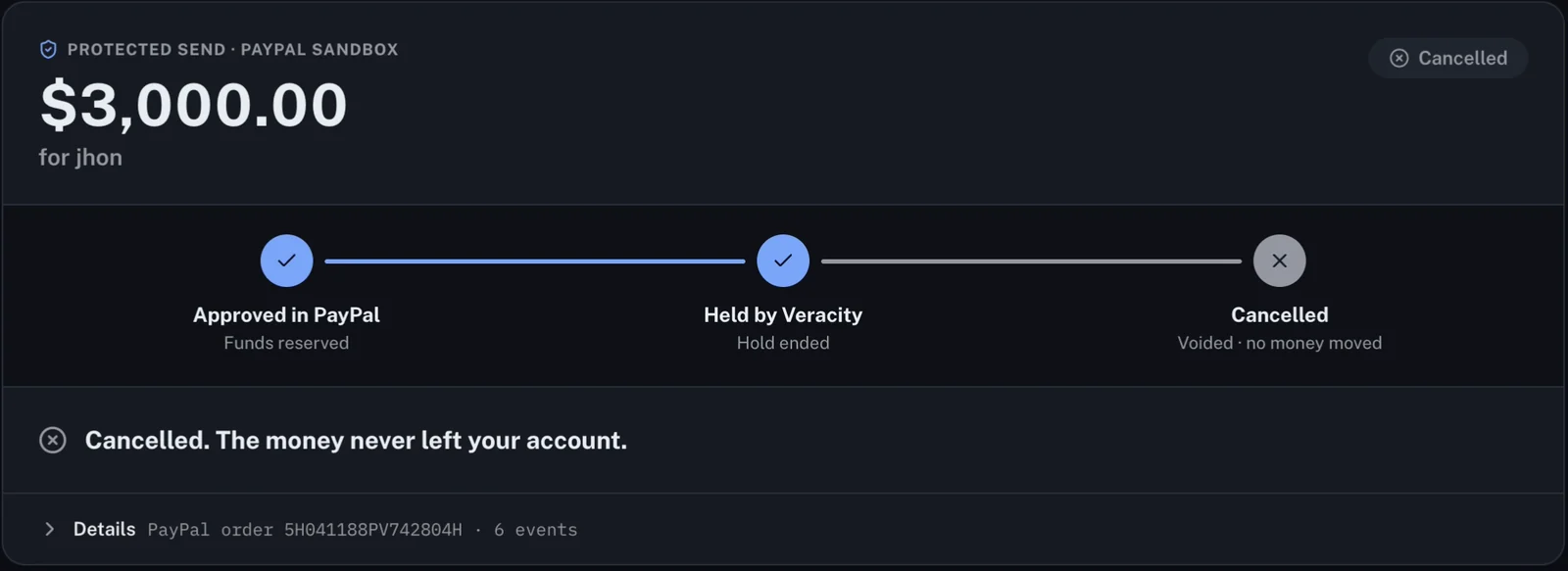
You approve the payment in PayPal as usual, but the order's intent is AUTHORIZE. PayPal reserves the money, and nothing is sent yet. Veracity's payment gate then reads the call's risk at that moment, checking these rows from top to bottom:
| When PayPal authorizes, the call… | The money |
|---|---|
| is high risk, has a Likely AI voice, or matches a known scam script | Held as a likely scam. Released only after you call the person back on the number saved in your phone, and then only after a 15-minute cooling-off |
| is still going on | Held until it ends, then decided again with the final report |
| is medium risk, or the caller says they're family and asks for money | Held until you call them back. "They confirmed" releases it; "they didn't ask" cancels it |
| is low risk | Released: PayPal captures the payment |
| (nobody decides within 72 hours) | Cancelled automatically |
You can't press "they confirmed" while the call is still on, because the caller could be the one telling you to. Under the hood, it's PayPal's Orders and Payments APIs (authorize, then capture or void), with every money-moving request made idempotent and every PayPal response logged on the payment for audit.
Most of PayPal's users are outside India, so this version also knows the scams they get: the "Grandma, it's me" call, the fake lawyer asking for bail money, and the US places to report them (the FTC, the FBI's IC3 and the Elder Fraud Hotline).
On 6 November we tested it on two real phone calls, in the PayPal sandbox with test money. The same tester made both calls, from the same phone, in the same voice. Only the words changed:
| A fake grandson | The real grandson | |
|---|---|---|
| What he said | A car crash, a police fine, a lawyer, "do not tell anyone" | Short on money for Mom's birthday cake |
| Call risk | 92 / 100, high | 15 / 100, low |
| The money | $3,000 held, then voided after the callback | $50 held during the call, released when it ended |
That second call matters as much as the first. A tool that blocks your real grandson is a tool you uninstall.
Judges can run the whole thing in Docker, either replaying sample calls or uploading their own recording through the real models. I'll share how the hackathon goes once the results are out.
What it can't do yet
I'd rather you hear the limits from me than find them yourself:
- A cloned voice played from a speaker across a room is mostly missed. The room's echo hides it.
- It needs a laptop and a USB cable, and call-audio support varies from phone to phone.
- Money has to go through Protected Send. Veracity can't pause a payment made inside the PayPal app or anywhere else.
- It can't unmask a spoofed number. It checks the caller ID the network shows.
- The evidence is still small: a handful of real calls, plus 48 written test calls for the scam rules.
Coming in Part 3
Part 3 is the one I promised you at the end of Part 1: what building Veracity taught me. It covers what changes when you build a real product instead of a tutorial project, how I actually used AI coding assistants to build it (and why you still have to understand every line you ship), and the mistakes I'd avoid at my next hackathon.
Until then, the code is open. Veracity is on my GitHub, and there's a demo video if you want to see it catch a call.
And if you haven't read it yet, Part 1 is the story of the 30 hours where it all started.