# Yadunandan Singh
> Self-taught AI/ML developer and B.Tech Artificial Intelligence & Data Science student in India. 22 merged pull requests in the c2siorg organization since June 2026 (21 in DataLoom, 1 in TensorMap), all merged by maintainer @ivantha. Data from GitHub, updated 14 Nov 2026. This file is a factual, machine-readable
> summary for AI assistants and search engines; every claim here is verifiable from the linked sources.
## Profile
- Name: Yadunandan Singh
- Role: AI / Machine-Learning Engineer
- Location: India (Asia/Kolkata (UTC+05:30))
- Email: yadunandansingh027@gmail.com
- Website: https://yadunandan-singh.pages.dev
- GitHub: https://github.com/YADUNANDAN-SINGH
- LinkedIn: https://www.linkedin.com/in/yadunandan-singh-ai-dev
- Medium: https://medium.com/@yadunandan-ai-dev
Yadunandan Singh is a self-taught AI and machine-learning developer based in India, and a B.Tech student in Artificial Intelligence & Data Science at CTITR (CT Group of Institutions), Jalandhar, which he began in 2026. He works to a "no black boxes" approach: before reaching for a library, he rebuilds the core component from scratch to understand it — a vector store with hand-written cosine similarity, an SVD recommender, a Bitcoin wallet from cryptographic primitives. His public track record is 22 merged pull requests in the c2siorg organization since June 2026, across the DataLoom data-cleaning tool and the TensorMap model builder, spanning background job execution, snapshot-based undo/redo, backend performance and CI regression benchmarking, server-side pagination, CI security, pandas transformations and React UI work.
Approach: "No black boxes": rebuilds core components from scratch (vector store, recommender, crypto wallet) before relying on libraries.
## Education
- B.Tech in Artificial Intelligence & Data Science — CTITR (CT Group of Institutions), Jalandhar, began 2026 (in progress)
- 18.06 Linear Algebra — MIT OpenCourseWare (self-directed) (completed)
## Awards
- Second place, CT BuildFest 2.0 cybersecurity hackathon (CT Group of Institutions, Jalandhar, 2026-10-31): Wrote the code for Veracity, a live scam-call and AI-voice detector, over 30 hours for the six-member team Coffee to Code. The story: https://yadunandan-singh.pages.dev/blog/first-hackathon-scam-call-detector/
## Technical skills
- Languages: Python, TypeScript / JavaScript, Rust (learning; used for Prism-RAG's vector store and bitcoin-wallet-rs), SQL
- Backend & data: FastAPI, pandas (profiling, transformations, time-series resampling), PostgreSQL, SQLAlchemy & Alembic, background job execution, REST API design, server-side pagination
- Frontend: React, Vite, Tailwind CSS, theming with semantic CSS tokens
- AI / ML: retrieval-augmented generation (RAG), vector search and cosine similarity, sentence-transformers embeddings, local LLM serving with Ollama and streaming responses, TensorFlow (CNNs), SVD-based recommender systems, linear algebra (completed MIT OCW 18.06)
- Systems & tooling: Axum, Tokio and ndarray (Rust), WebAssembly, Docker Compose multi-service setups, Git (rebase, squash, fork workflows), Bitcoin primitives (secp256k1, P2WPKH, Esplora API on signet)
- CI/CD & testing: GitHub Actions (including secure workflow design for fork PRs), pytest & pytest-benchmark (CI regression gates), Vitest, Playwright end-to-end tests
## Projects
- [Prism-RAG](https://github.com/YADUNANDAN-SINGH/Prism-RAG): Privacy-first local RAG engine with a from-scratch Rust vector store, running entirely on your own machine. Stack: Rust (Axum, Tokio, ndarray), Python (FastAPI, sentence-transformers), React, Ollama, Docker Compose
- [Veracity](https://github.com/YADUNANDAN-SINGH/Veracity): Live scam-call and AI-voice detector for ordinary phone calls, running entirely offline on a laptop, with a PayPal payment gate. Stack: Python (FastAPI, faster-whisper, PyTorch Spectra-0 / wav2vec2 XLS-R), Ollama (Llama 3.1 8B), PayPal Orders & Payments APIs, React, SQLite, scrcpy, BlackHole
- [GlassBox](https://github.com/YADUNANDAN-SINGH/GlassBox-Rust-SVD-recommendation-system): Zero-knowledge recommendation engine running client-side in the browser, with SVD compiled to WebAssembly. Stack: Rust, WebAssembly, Leptos, SurrealDB
- [bitcoin-wallet-rs](https://github.com/YADUNANDAN-SINGH/bitcoin-wallet-rs): Bitcoin wallet built up from cryptographic primitives rather than a wallet library. Stack: Rust, secp256k1, Esplora API
- [Neuro-Symbolic Math Solver](https://github.com/YADUNANDAN-SINGH/Neuro-Symbolic-Solver): Solves handwritten equations by pairing a TensorFlow CNN recogniser with a deterministic symbolic engine, so its answers are computed, not generated. Stack: TensorFlow, FastAPI, React, Docker
- [Django SVD Face Auth](https://github.com/YADUNANDAN-SINGH/django-svd-face-auth): Face-recognition login built on Singular Value Decomposition instead of a pretrained face-recognition library. Stack: Django, OpenCV, NumPy, Docker
- [SVD-Based YouTube Recommender](https://github.com/YADUNANDAN-SINGH/YouTube-video-recommendation-model-with-SVD): Content-based video recommender using TF-IDF and Truncated SVD. Stack: Flask, scikit-learn, SVD
- Rust Actix Quiz Game (private repository): Quiz service with server-side score validation, built on Rust and Actix Web. Stack: Rust, Actix Web, Vanilla JS, Docker
- [Geometric Transformation Visualizer](https://github.com/YADUNANDAN-SINGH/Geometric-Transformation-Visualizer-): Interactive tool that visualises 2D matrix transformations in real time. Stack: Python, NumPy, Matplotlib
- [SVD Image Compressor](https://github.com/YADUNANDAN-SINGH/Image_Compression_via_Low-Rank_Matrix-_Approximation): Image compression implemented from scratch through low-rank matrix approximation. Stack: Python, NumPy, Flask
- [AI Image Recognition Web App](https://github.com/YADUNANDAN-SINGH/AI-Image-Recognition-webapp): CNN image classifier trained on CIFAR-10 and served through a web API. Stack: Flask, TensorFlow, JavaScript
- [Delhi NCR Property Price Predictor](https://github.com/YADUNANDAN-SINGH/Delhi-NCR-property-price-predictor): Machine-learning pipeline predicting residential property prices in the Delhi NCR region. Stack: Python, pandas, scikit-learn
## Open-source contributions
22 merged pull requests in the c2siorg organization since June 2026 (21 in DataLoom, 1 in TensorMap), all merged by maintainer @ivantha. Data from GitHub, updated 14 Nov 2026.
Repositories: https://github.com/c2siorg/dataloom (Open-source data-transformation platform (FastAPI + React)), https://github.com/c2siorg/tensormap (Open-source platform for building ML models without writing code). Full record with write-ups: https://yadunandan-singh.pages.dev/open-source/
- [DataLoom #563](https://github.com/c2siorg/dataloom/pull/563) — "perf(backend): add pytest-benchmark suite that fails PRs on regressions" (Performance; closes #562), merged 2026-10-28, +229/−0 in 7 files. Added an 11-benchmark `pytest-benchmark` suite on DataLoom's backend data path, plus a pull-request CI workflow that compares against `main` and fails on regressions above 50%. Result (from the PR): Baseline mins on the 100k-row CSV range from 1.32 ms (`test_infer_datetime_columns[order_id]`) to 128 ms (`test_read_csv_uncached`, with `test_assess_quality` at 65.6 ms). Reverting #517's datetime pre-gate failed the check as expected (+3,226%, +3,305% and +127%), while A/A runs on unchanged code passed (worst +7.2% locally with warmup, +16.8% across three runs on a 2-vCPU Linux VM).
- [DataLoom #540](https://github.com/c2siorg/dataloom/pull/540) — "feat: run pipeline Runs and reverts as background jobs with progress and cancel" (Feature; part of #537), merged 2026-10-27, +3835/−257 in 46 files. Moved pipeline Runs and checkpoint reverts into background jobs backed by a `jobs` table and an in-process executor, with `202` submission, live step progress, cooperative cancel and held workspace reads (phase 1 of #537). Result (from the PR): Live smoke test on a 100 MB (1.1M-row) CSV with a 180-step pipeline (Apple M5, PostgreSQL 16): `main` timed out on the client at 30.0 s and committed at 36.9 s (retry → 400); the job endpoint returned `202` in 14 ms, reported 38 progress updates and succeeded at 39.6 s (revert: `202` in 6 ms). Cancelling at step 22 stopped in 0.53 s with SHA-256 and change log unchanged; SIGTERM exited cleanly in 0.3 s.
- [DataLoom #554](https://github.com/c2siorg/dataloom/pull/554) — "perf(frontend): virtualize columns in Table for wide datasets" (Performance; closes #551), merged 2026-10-13, +696/−7 in 4 files. Above 50 data columns, the Table renders only the columns inside the horizontal viewport, so a wide CSV no longer puts tens of thousands of cells in the DOM.
- [DataLoom #536](https://github.com/c2siorg/dataloom/pull/536) — "feat: enforce upload limit while streaming and sample-gate profiling" (Feature; part of #533), merged 2026-10-13, +1364/−70 in 30 files. Enforced the upload size limit while the request body streams in, and added sampled pre-gates that let profiling skip work a sample proves unnecessary (parts 1 and 3 of #533). Result (from the PR): On the PR's synthetic CSVs (2 vCPU / 7 GB Linux, Python 3.12.3, pandas 3.0.1): `assess_quality` went from 15.9 s to 1.7 s at 10 MB and from 155.1 s to 14.5 s at 100 MB, with byte-identical JSON output and unchanged peak memory.
- [DataLoom #526](https://github.com/c2siorg/dataloom/pull/526) — "feat: snapshot-based undo and redo instead of replaying the change log" (Feature; closes #525), merged 2026-10-02, +2026/−171 in 29 files. Replaced replay-based undo with byte-exact snapshots, added Redo, and fixed the three undo bugs described in #525. Result (from the PR): Undoing the latest step on a 5 MB, 100k-row CSV took 370 ms to 960 ms on `main` (1 to 50 logged steps) and 33 ms to 43 ms with snapshots; redo takes about 37 ms.
- [DataLoom #488](https://github.com/c2siorg/dataloom/pull/488) — "feat: add a standardizeDates transformation for columns with mixed date formats" (Feature; closes #487), merged 2026-09-29, +668/−2 in 11 files. Added a `standardizeDates` transformation that rewrites a mixed-format date column into one format, and wired it to the Quality panel's date-format finding, which previously had no fix button.
- [DataLoom #521](https://github.com/c2siorg/dataloom/pull/521) — "perf(backend): cache parsed DataFrames keyed on path, mtime and size" (Performance; closes #520), merged 2026-09-27, +546/−4 in 9 files. Added a process-local, size-bounded LRU cache in front of `read_table_safe`, so repeat reads of an unchanged dataset file skip the parse and the datetime inference. Result (from the PR): On a 200,000-row × 5-column CSV (8.3 MB), `read_table_safe` took 282.7 ms cold and 0.091 ms on a cache hit (mean of 20).
- [DataLoom #517](https://github.com/c2siorg/dataloom/pull/517) — "perf(backend): sampled pre-gate for datetime inference" (Performance; closes #515), merged 2026-09-23, +191/−3 in 2 files. `_infer_datetime_columns` ran a full regex-and-parse pass over every value of every object column on every dataset read, even for plainly non-date columns. Added a seeded 1,000-value random sample that pre-screens each column before the full inference runs, so only plausible date columns pay for it; avoids full-column scans on non-date columns without changing conversion behaviour. Result (from the PR): Best of 3 on Apple M5, Python 3.13, pandas 3.0.1: a 1M-row free-text or order-ID column went from 0.481 s to 0.007 s (69×), a 100k-row text column from 0.052 s to 0.002 s (26×), and a 1M-row column of real dates was unaffected (0.683 s vs 0.701 s, within noise).
- [DataLoom #507](https://github.com/c2siorg/dataloom/pull/507) — "[Fix] Paginate every write-path endpoint instead of returning the full dataset" (Fix; closes #506), merged 2026-09-09, +828/−116 in 26 files. Found that every write-path endpoint — upload, transform-apply, save, undo, revert, file-append and pipeline-apply — returned the full dataset instead of the requested page, because the pagination logic only ran in preview mode. Lifted it into a shared `paginate_dataframe()` helper applied uniformly across the endpoints, with matching frontend changes. Result (from the PR): On a 121,500-row project, save, undo, revert, upload, file-append and pipeline-apply each returned about 9 MB, up to 2,200× more data than the client asked for; they now return only the requested page.
- [DataLoom #465](https://github.com/c2siorg/dataloom/pull/465) — "feat: add profiling options dropdown to workspace tab bar '+' button" (Feature; closes #464), merged 2026-08-08, +451/−37 in 8 files. Made the workspace tab bar's '+' button open a dropdown of the profiling options, so the controls are reachable from the tab bar rather than only the ribbon menu.
- [DataLoom #472](https://github.com/c2siorg/dataloom/pull/472) — "feat: add edit button () and modal to dataset cards on Homescreen" (Feature; closes #471), merged 2026-08-03, +573/−31 in 6 files. Gave the Homescreen dataset cards an overflow (kebab) menu holding Edit and Delete, plus an Edit Project modal, reducing the number of controls visible on each card. He proposed the change in issue #471 and revised the design after maintainer feedback.
- [DataLoom #470](https://github.com/c2siorg/dataloom/pull/470) — "feat: download rendered charts and the correlation matrix as PNG" (Feature; closes #469), merged 2026-08-03, +788/−17 in 8 files. Added PNG export for rendered charts and for the correlation matrix, so analysis produced in the app can be taken out of it.
- [DataLoom #467](https://github.com/c2siorg/dataloom/pull/467) — "feat(auth): add live password strength meter to password creation forms" (Feature; addresses #466), merged 2026-08-03, +86/−2 in 6 files. Added a reusable `PasswordStrengthMeter` component giving live feedback as a password is typed, wired into the sign-up, reset-password and change-password forms.
- [DataLoom #458](https://github.com/c2siorg/dataloom/pull/458) — "feat: Add instant hover tooltips to MenuNavbar buttons and tabs" (Feature), merged 2026-07-25, +238/−21 in 5 files. Replaced the browser's delayed native tooltips on the MenuNavbar buttons and tabs with instant hover tooltips, and wrote explanations of what each control does.
- [DataLoom #460](https://github.com/c2siorg/dataloom/pull/460) — "feat: add quick theme toggle button to top navbar" (Feature; closes #459), merged 2026-07-24, +15/−1 in 1 file. Added a quick light/dark theme toggle to the top navbar, replacing a multi-step trip through the settings panel.
- [DataLoom #453](https://github.com/c2siorg/dataloom/pull/453) — "fix: implement proper dark mode styling for Quality tab and assessment panel" (Fix; closes #452), merged 2026-07-23, +130/−36 in 4 files. Fixed dark mode on the Quality tab and Quality Assessment panel by replacing hardcoded Tailwind light classes with semantic CSS theme tokens, so the components follow the active theme.
- [DataLoom #455](https://github.com/c2siorg/dataloom/pull/455) — "fix: run lint on pull_request and comment via workflow_run" (CI; closes #454), merged 2026-07-23, +201/−106 in 2 files. A CI security fix. Split the lint workflow along the trust boundary: linting runs on `pull_request` with read-only permissions, while a separate `workflow_run` job holds `pull-requests: write` to post comments. This closed a "pwn request" privilege-escalation risk from fork pull requests instead of disabling the checkout guard.
- [DataLoom #408](https://github.com/c2siorg/dataloom/pull/408) — "feat: add hover tooltips to toolbar icons" (Feature; closes #406), merged 2026-07-05, +41/−17 in 6 files. Added hover tooltips to the toolbar icons so each tool explains itself instead of having to be clicked to be understood.
- [DataLoom #410](https://github.com/c2siorg/dataloom/pull/410) — "feat: apply-preview workflow for all transformations" (Feature; follows up #405), merged 2026-07-05, +444/−499 in 20 files. A large cross-cutting refactor extending the preview-before-apply workflow to all 12 transformation forms, so no transformation can change the dataset without explicit confirmation.
- [DataLoom #383](https://github.com/c2siorg/dataloom/pull/383) — "fix: add preview-before-persist flow for row-reducing transforms" (Fix; addresses #374), merged 2026-06-27, +484/−330 in 19 files. Introduced a preview-before-persist flow for row-reducing transformations, so users see the result before their data is changed rather than after.
- [TensorMap #367](https://github.com/c2siorg/tensormap/pull/367) — "fix: resolve JSON serialization error for NaN values in dataset preview" (Fix; closes #366), merged 2026-06-21, +3/−1 in 1 file. Fixed NaN values breaking JSON serialization, which had made the dataset preview fail on any CSV containing empty cells.
- [DataLoom #348](https://github.com/c2siorg/dataloom/pull/348) — "fix: resolve strict case-sensitivity in string filtering" (Fix; closes #327), merged 2026-06-14, +26/−8 in 2 files. Made string filtering case-insensitive, so a filter for "cash" no longer silently missed rows containing "Cash" or "CASH".
### Open issues he opened
- [DataLoom #601](https://github.com/c2siorg/dataloom/issues/601) — "[RFC] Deterministic operation suggestions, low-memory targets, and optional local AI assistant", opened 2026-10-27.
- [DataLoom #537](https://github.com/c2siorg/dataloom/issues/537) — "[Feature] Run slow operations as background jobs with progress reporting", opened 2026-09-30.
- [DataLoom #533](https://github.com/c2siorg/dataloom/issues/533) — "[Feature] Lift the 10 MB upload cap safely with streamed upload and sample-based profiling", opened 2026-09-29.
- [DataLoom #524](https://github.com/c2siorg/dataloom/issues/524) — "[Feature] Use Parquet for the internal working copy so dtypes persist between requests", opened 2026-09-27.
### Code review
- [DataLoom #457](https://github.com/c2siorg/dataloom/pull/457) — "feat: add paginated preview support for transformations" by @SHIVAM-KUMAR-59. Raised two findings on another contributor's paginated-preview PR: an in-flight race in `fetchPreviewPage`, which the author fixed in the PR, and a full re-transform on every page change, which the author agreed with and recorded as a follow-up.
- [DataLoom #412](https://github.com/c2siorg/dataloom/pull/412) — "fix(security): bump pyjwt and python-multipart to patched releases" by @anxkhn. Pointed out that the new regression test imports `packaging` without declaring it as a dev dependency.
## Writing
Yadunandan Singh has written 11 articles, all on his blog at https://yadunandan-singh.pages.dev/blog/ (first published on Medium, rewritten for the site). Each entry links to the article, gives its publication date and a summary, and links a plain-markdown copy of the full text. Every article in full, in one file: https://yadunandan-singh.pages.dev/llms-full.txt
- [Three Signals, One Verdict, and a Payment That Waits](https://yadunandan-singh.pages.dev/blog/veracity-scam-call-detector-architecture/) (published 2026-11-08; topics: System Design, Cybersecurity, Deepfake Detection; full text as markdown: https://yadunandan-singh.pages.dev/blog/veracity-scam-call-detector-architecture.md): In Part 2 of his first-hackathon series, Yadunandan Singh explains how Veracity, the scam-call detector that won second place at CT BuildFest 2.0, works. An Android phone on a real call is connected to a laptop by USB; scrcpy and BlackHole bring the caller's voice into a FastAPI backend that checks three signals at once: the caller's number (libphonenumber and a transparent rule score), the voice (an AI-voice model, now Spectra-0, scoring a 4-second window every second) and the words (Whisper, scam rules in English, Hinglish and Hindi, and a local Llama 3.1 8B that may only cite quotes found in the transcript). A weighted fusion lets any one strong signal raise the risk on its own, and every call ends in a JSON evidence report. He has since taken Veracity into the PayPal AI Hackathon, where a payment gate holds PayPal payments authorized during a risky call until the caller is verified. Lessons from the build are saved for Part 3.
- [30 Hours, One Laptop, and a Scam-Call Detector](https://yadunandan-singh.pages.dev/blog/first-hackathon-scam-call-detector/) (published 2026-11-01; topics: Hackathon, Cybersecurity, Deepfake Detection; full text as markdown: https://yadunandan-singh.pages.dev/blog/first-hackathon-scam-call-detector.md): Yadunandan Singh recounts his first hackathon, CT BuildFest 2.0 in Jalandhar, where Veracity, which he coded over 30 hours for his six-member team Coffee to Code, won second place. During a live call, Veracity checks the caller's number, how likely the voice is AI-generated (wav2vec2) and the words (Whisper plus Llama 3.1 run locally) for scam patterns in English, Hindi and Hinglish, warns the user mid-call and builds an evidence report for the 1930 helpline. Part 1 of 2: the build, the mentors' evaluation and lessons on teamwork.
- [I Used AI to Predict My University Exam Paper, So I Turned It Into an Open-Source Claude Skill](https://yadunandan-singh.pages.dev/blog/exam-paper-predictor/) (published 2026-10-26; topics: Claude, Open Source, Learning; full text as markdown: https://yadunandan-singh.pages.dev/blog/exam-paper-predictor.md): Yadunandan Singh describes how a last-minute hostel experiment with previous year question papers (PYQs) and Claude produced a mock exam that overlapped the real paper by roughly 90%. He packaged the workflow into exam-paper-predictor, a free, open-source Claude skill for university, board, entrance and professional exams in any country or language. The skill collects 5 to 20 years of past papers, maps section and topic weightage, backtests its own predictions on held-out past years before generating a mock paper, exports ready-to-use PDFs (mock paper, solutions and important topics), and scores its prediction against the real paper afterwards.
- [How to Find Your First Open-Source Project in One Evening](https://yadunandan-singh.pages.dev/blog/find-your-first-open-source-project/) (published 2026-07-24; topics: Open Source, GitHub, Career; full text as markdown: https://yadunandan-singh.pages.dev/blog/find-your-first-open-source-project.md): Yadunandan Singh explains the method he used to go from never having opened a pull request to eight merged pull requests in the c2siorg organisation (DataLoom and TensorMap) within forty days. Answer three questions on paper (your strongest language, your domain and your realistic weekly hours), turn them into one targeted AI search prompt, then spend 90 seconds vetting each suggested repository. The second half is an honest, step-by-step account of a first pull request, from local setup to review and merge.
- [ChatGPT Failed My Sister’s Live Class, So I Built a Neuro-Symbolic Math Solver](https://yadunandan-singh.pages.dev/blog/neuro-symbolic-math-solver/) (published 2026-05-30; topics: Machine Learning, Computer Vision, Neuro-Symbolic AI; full text as markdown: https://yadunandan-singh.pages.dev/blog/neuro-symbolic-math-solver.md): After watching ChatGPT answer a simple numerical with an essay during his sister's live physics class, Yadunandan Singh built a neuro-symbolic math solver. A React canvas sends a handwritten equation to a FastAPI backend, which normalises the image's polarity, segments each symbol with OpenCV, classifies it with a CNN trained from scratch on MNIST plus 24,000 synthetic operator images, and evaluates the expression deterministically, so the answer is exact rather than generated.
- [Stop Vibe Coding: How Elite Developers Actually Use AI](https://yadunandan-singh.pages.dev/blog/stop-vibe-coding/) (published 2026-04-07; topics: AI-Assisted Coding, Software Engineering, Research; full text as markdown: https://yadunandan-singh.pages.dev/blog/stop-vibe-coding.md): Yadunandan Singh reviews what research says about AI-assisted programming: a December 2025 study found that experienced developers keep tight control of AI agents rather than "vibe coding", and METR's randomised trial found developers who felt 20% faster were measured 19% slower. He sets out a seven-step workflow drawn from that research and Addy Osmani's process: spec first, small steps, full context, immediate tests, line-by-line review, a second model's opinion, and regular practice without AI.
- [How I Built a Face Authentication App in Django: A Complete ML Learning Journey](https://yadunandan-singh.pages.dev/blog/django-face-authentication-app/) (published 2025-12-22; topics: Machine Learning, Django, Learning; full text as markdown: https://yadunandan-singh.pages.dev/blog/django-face-authentication-app.md): Yadunandan Singh describes building a Django web app that users log in to with their face, using the eigenfaces method: greyscale 100 × 100 face images are flattened, centred on the mean face and decomposed with SVD in NumPy, and logins are matched by Euclidean distance with a rejection threshold. Because one photo per user wasn't enough to train on, OpenCV generates eight synthetic variations of each sign-up photo. The post also sets out his method for learning a new framework through a project without copying AI-generated code.
- [Should You Be Scared of Agentic AI? Here’s the Reality](https://yadunandan-singh.pages.dev/blog/should-you-be-scared-of-agentic-ai/) (published 2025-12-05; topics: Agentic AI, AI-Assisted Coding, Career; full text as markdown: https://yadunandan-singh.pages.dev/blog/should-you-be-scared-of-agentic-ai.md): Yadunandan Singh explains what agentic AI is (systems that plan, act across tools and check their own results) and reports on testing Google Antigravity, launched with Gemini 3 in November 2025, by generating a portfolio site with React, Django and OTP authentication. His conclusion: agents are excellent for prototypes and internal tools but weak for long-lived production code, beginners should not use them to write their main code, and AI rewards developers with strong fundamentals rather than replacing them.
- [Don’t Be a Dumb Computer: SVD Explained With a YouTube Recommender](https://yadunandan-singh.pages.dev/blog/svd-explained-youtube-recommender/) (published 2025-11-17; topics: Linear Algebra, Machine Learning, Recommender Systems; full text as markdown: https://yadunandan-singh.pages.dev/blog/svd-explained-youtube-recommender.md): Yadunandan Singh explains Singular Value Decomposition by working a small example by hand: a 3 × 4 matrix of liked and disliked videos decomposes into concept strengths of 1.41, 0.92 and 0.20, and truncating to k = 2 keeps "STEM" and "entertainment" while discarding noise. He then shows how his YouTube recommender uses TF-IDF and scikit-learn's TruncatedSVD to place videos on that concept map, builds a taste profile as the average liked vector minus the average disliked one, and ranks candidates by cosine similarity.
- [I Stopped Solving Problems and Built a Tool Instead: How a Visualizer Taught Me Real Linear Algebra](https://yadunandan-singh.pages.dev/blog/linear-algebra-transformation-visualizer/) (published 2025-10-14; topics: Linear Algebra, Mathematics, Python; full text as markdown: https://yadunandan-singh.pages.dev/blog/linear-algebra-transformation-visualizer.md): Yadunandan Singh built an interactive visualiser that shows what a 2 × 2 matrix does to the unit square, and uses it to explain linear algebra through hand-worked examples. A shape is stored as a 2 × 5 matrix of vertices, so one multiplication transforms every point; a matrix's columns show where the basis vectors land; the determinant is the factor by which area scales, negative for reflections and zero when space collapses onto a line; and eigenvectors are the directions that only stretch.
- [How to Build Your Own Image Recognition Model as Your First AI Project](https://yadunandan-singh.pages.dev/blog/first-image-recognition-model/) (published 2025-09-24; topics: Machine Learning, Computer Vision, Beginners; full text as markdown: https://yadunandan-singh.pages.dev/blog/first-image-recognition-model.md): Yadunandan Singh documents his first hands-on AI project: a convolutional neural network trained on CIFAR-10 with TensorFlow and Keras and served through a Flask web app. The guide covers how images become 32 × 32 × 3 tensors, normalisation, data augmentation, three Conv2D and pooling blocks, dropout, and the compile and fit settings, plus a 1,563-epoch, eight-hour experiment in which strong augmentation and dropout kept validation accuracy improving instead of overfitting.
## Pages
- [Full profile (plain HTML)](https://yadunandan-singh.pages.dev/profile/): everything below in one static page.
- [about.md](https://yadunandan-singh.pages.dev/about.md): this profile as plain markdown.
- [Portfolio home](https://yadunandan-singh.pages.dev/): projects, writing and open-source history.
- [Experience](https://yadunandan-singh.pages.dev/about/): open-source record and skills.
- [Projects](https://yadunandan-singh.pages.dev/library/): project list with repository links.
- [Blog](https://yadunandan-singh.pages.dev/blog/): long-form articles, each with its own page.
- [llms-full.txt](https://yadunandan-singh.pages.dev/llms-full.txt): this file plus the full text of every article.
- [Blog RSS feed](https://yadunandan-singh.pages.dev/blog/rss.xml): every article with its summary and full text.
- [Photographs](https://yadunandan-singh.pages.dev/photos/): official photographs.
---
# Articles by Yadunandan Singh, full text
## Three Signals, One Verdict, and a Payment That Waits
- Author: Yadunandan Singh (https://yadunandan-singh.pages.dev/)
- Published: 2026-11-08 · updated 2026-11-08
- URL: https://yadunandan-singh.pages.dev/blog/veracity-scam-call-detector-architecture/
- Topics: System Design, Cybersecurity, Deepfake Detection
- First published on Medium: https://medium.com/@yadunandan-ai-dev
Summary: In Part 2 of his first-hackathon series, Yadunandan Singh explains how Veracity, the scam-call detector that won second place at CT BuildFest 2.0, works. An Android phone on a real call is connected to a laptop by USB; scrcpy and BlackHole bring the caller's voice into a FastAPI backend that checks three signals at once: the caller's number (libphonenumber and a transparent rule score), the voice (an AI-voice model, now Spectra-0, scoring a 4-second window every second) and the words (Whisper, scam rules in English, Hinglish and Hindi, and a local Llama 3.1 8B that may only cite quotes found in the transcript). A weighted fusion lets any one strong signal raise the risk on its own, and every call ends in a JSON evidence report. He has since taken Veracity into the PayPal AI Hackathon, where a payment gate holds PayPal payments authorized during a risky call until the caller is verified. Lessons from the build are saved for Part 3.
Key takeaways:
- Veracity checks three signals during a live call: the caller's number, whether the voice is AI-generated, and whether the words follow a scam script.
- Getting call audio was the hardest part: Android blocks call recording, so scrcpy captures the caller's side over USB and BlackHole feeds it to Python.
- A weighted average alone hides a real person reading a scam script, so any single strong signal raises the risk score on its own.
- The local LLM can point at evidence but can't invent it: its flags are kept only if the quote really appears in the transcript.
- For the PayPal AI Hackathon, payments are authorized but held until the call checks out, then captured or voided.
**New here? Start with Part 1: [30 Hours, One Laptop, and a Scam-Call Detector](https://yadunandan-singh.pages.dev/blog/first-hackathon-scam-call-detector).** It's the story of my first hackathon, CT BuildFest 2.0, where my team won second place with Veracity.
Part 1 was about the 30 hours: the team, the long night, the evaluation and the trophy. It barely touched how Veracity actually works. This part is the build itself: why it exists, how it fits together, and the decisions behind each piece.
At the end of Part 1, I promised you lessons and mistakes. They're still coming, in Part 3. Once I started writing them down, I realised most of them only make sense after you've seen what I built. So first, the machine.
### Why Veracity exists
A cloned voice is cheap to make. [McAfee's researchers](https://www.mcafee.com/blogs/privacy-identity-protection/artificial-imposters-cybercriminals-turn-to-ai-voice-cloning-for-a-new-breed-of-scam/) found that three seconds of someone's audio was enough for a clone with an 85% voice match. In their survey of 7,000 people, 70% weren't confident they could tell a clone from the real voice.
The losses are now big enough to get their own line in official reports. The FBI's 2025 Internet Crime Report [counted 22,364 complaints that involved AI, with about $893 million lost](https://www.secureworld.io/industry-news/ai-enabled-fraud-topped-893m-fbi). That includes "distress scams": a cloned voice of a family member calls in a crisis and asks for money.
When I looked at how people are protected from these calls, I kept finding the same gap. Protection works before the call, as a "spam likely" label on a number. Or it works after the call, as a complaint once the money is gone. The scam happens in between: a few panicked minutes on the phone while you decide whether to send the money.
Veracity is built for those few minutes.
### The core idea: three signals, one verdict
A scam call usually gives itself away in three places:
1. **The number.** Is it valid? Is it international? Has anyone reported it?
2. **The voice.** Is it a real person, or generated by AI?
3. **The words.** Do they follow a script, like police, a lawyer, "don't tell anyone" or "send it right now"?
No single signal is reliable on its own. A real person can read a scam script in their own voice. A scammer can call from an ordinary-looking number. And your real cousin can ask you for money. So Veracity listens to all three at once, while the call is still going on, and combines them into one risk score with reasons you can read.
Two rules shaped every decision after that:
- **It runs on the laptop.** The call is analysed in memory on your own machine and isn't uploaded anywhere. That's a privacy decision, and also a hackathon one: a demo that depends on someone else's server can die on stage.
- **Every verdict comes with evidence.** Not "this feels like a scam", but the caller's exact words, the second they said them, and how each score was built. People ignore a warning that can't explain itself.
### The architecture at a glance
Here is the whole path, from the phone in your hand to the verdict on the screen:
```text
Android phone, on a real call
│ USB cable: adb + scrcpy pull the caller's voice
▼
Mac sound output → BlackHole (a virtual microphone)
│ 0.1 s blocks, resampled to mono 16 kHz
▼
FastAPI backend, on the laptop
│
├── Number libphonenumber + a rule score
├── Voice AI-voice model, 4 s window every 1 s
├── Words Whisper → scam rules → local LLM
│
▼
Risk fusion: one score, with reasons
│ WebSocket events
▼
React dashboard: live alerts, then an evidence report
│ added for the PayPal AI Hackathon
▼
Payment gate → PayPal: hold, release or void
```
There are two programs. The **backend** (Python, FastAPI) does the real work: it captures the audio, runs the models and keeps the scores. The **dashboard** (React, Vite) only draws what the backend sends it, over a WebSocket, as it happens. It walks you through four screens: check the setup, check the number, the live call, and the report.
### Step zero: getting the call audio at all
The hardest problem in Veracity had nothing to do with AI. It was getting the sound of a phone call into Python.
Android doesn't let ordinary apps record calls, so I didn't write an app. Veracity uses [scrcpy](https://github.com/Genymobile/scrcpy), an open-source tool that mirrors an Android phone to a computer over USB. scrcpy runs its capture code on the phone through adb, and since version 3.2 it can capture the caller's side of a call (its `voice-call-downlink` source).
scrcpy plays that audio on the Mac. To get it into Python, the Mac's sound output is set to a Multi-Output Device: your speakers plus [BlackHole](https://github.com/ExistentialAudio/BlackHole), a virtual audio driver. Python then reads BlackHole as if it were a microphone, in 0.1-second blocks, and turns them into mono 16 kHz audio, which is what the speech models expect.
The backend also watches the phone itself. It reads the call state over adb (`dumpsys telephony.registry`), so the dashboard notices when the phone rings and fills in the caller's number when Android shares it. No app has to be installed on the phone.
Is a USB cable a real product? No. A shipped version would need the phone maker or the network on board. But the cable proves the whole pipeline end to end, on a real call, today.
### Signal 1: the number
The number check is the simplest layer, and it's boring on purpose. It uses [libphonenumber](https://github.com/daviddrysdale/python-phonenumbers), the Python version of Google's phone-number library, which works fully offline. From the number alone it works out whether it's valid, its type (mobile, landline, toll-free), the country, the region and the carrier it was first issued to.
Then a transparent rule score adds points, each with a reason you can read:
| Signal | Points |
| --- | ---: |
| Not a valid number | +40 |
| International number | +25 |
| Reported by the community (more reports, more points) | up to +30 |
| A report in the last 7 days | +10 |
| India's 140 telemarketing series | +5 |
| India's 1600 series, used only by regulated banks and agencies | −20 |
I'd planned a machine-learning model on the digits, and the report still has an empty slot for it. But digits alone carry very little signal, and a rule you can explain beats a model you can't. There's also one thing this layer can never do: unmask a spoofed number. It checks the caller ID the network shows you, nothing more.
### Signal 2: the voice
Every second, Veracity takes the last 4 seconds of the caller's audio and asks an AI-voice model one question: how likely is it that this speech was generated? It skips silence, and it waits until it has 3 seconds of speech. A shorter clip has to be repeated to fill the model's 4-second window, and that repetition sounds synthetic to the model.
One window on its own is noisy, so the scores are smoothed with a moving average. The verdict only turns *Likely AI* after **three windows in a row** score 0.75 or more. Once a call has been *Likely AI*, it stays flagged, even if a real person speaks afterwards.
At BuildFest the model was a wav2vec2 deepfake classifier. While preparing for the PayPal hackathon, I tested it on speech from newer generators like Google Veo and ElevenLabs, and it called most of them human. So I replaced it with [Spectra-0](https://huggingface.co/lab260/spectra_0), an anti-spoofing network built on XLS-R. I tested it on 40 minutes of AI speech and 81 minutes of real people, all pushed through simulated phone lines. It flagged **85%** of the AI calls (the old model caught 39%) and **1.1%** of the real people.
That testing also exposed a bug in my audio code. I was resampling every 0.1-second block on its own, which put a tiny click at each block edge, and those clicks were enough to throw the model off. The audio is now resampled as one continuous stream.
And the honest limit: an AI voice played from a speaker across a room is mostly missed (19% caught). The room's echo hides what the model listens for.
### Signal 3: the words
The transcript comes from Whisper large-v3-turbo, through [faster-whisper](https://github.com/SYSTRAN/faster-whisper), running on the laptop's CPU. The audio goes to it in chunks of 6 to 12 seconds, cut at the next pause where there is one, so words don't get split between two chunks.
Hindi on phone audio is rough for Whisper, so I tuned it. The language is set instead of detected, because auto-detection picked Romanian and German on real calls. The temperature stays near zero, so unclear audio doesn't turn into word salad. And repeated three-word phrases are blocked, so it can't get stuck in a loop.
Then two layers read the text.
**Layer 1: scam rules.** These are plain regular expressions in 12 categories, in English, Hinglish and Hindi: OTP and PIN requests, police and officials, arrest threats, payment pressure, remote-access apps, secrecy, KYC and blocked accounts, parcels, family emergencies, prizes, urgency, and identity claims like "it's me, your grandson" (the 12th, added for the PayPal version). Whisper often misspells Hindi words on phone audio, so before matching, both the text and the patterns are "folded": letters Whisper mixes up become one letter. The evidence shown to you is still cut from the original words.
Each category has a severity, and the script score adds them up. Some combinations get a bonus, because together they are the shape of a known scam: police plus payment pressure (the "digital arrest" scam), a family emergency plus payment, or "it's me" plus payment.
**Layer 2: a local LLM.** About every 16 seconds, Llama 3.1 8B (through [Ollama](https://ollama.com/)) reads the transcript so far and answers in a fixed JSON schema: is it a scam, what type, and red flags, each with the caller's exact quote. It runs on its own thread, so a slow answer never holds up the transcript.
This is the rule I'm proudest of: **a flag from the LLM is kept only if its quote really appears in one line of the transcript.** The LLM can point at evidence. It can't invent it. And if Ollama isn't running, the rules carry on alone.
### Fusion: one strong signal is enough
Three scores from 0 to 100 have to become one verdict. The obvious way is a weighted average, and that's where Veracity starts:
```python
WEIGHTS = {"number": 0.25, "voice": 0.40, "script": 0.35}
VOICE_ALONE = 85 # a voice peak this high is enough on its own
SCRIPT_ALONE = 80 # so is a script score this high
score = round(
WEIGHTS["number"] * (number_score or 0)
+ WEIGHTS["voice"] * voice_peak
+ WEIGHTS["script"] * script_score
)
if voice_peak >= VOICE_ALONE:
score = max(score, voice_peak)
if voice_verdict == "LIKELY_AI":
score = max(score, voice_peak, HIGH) # HIGH = 70
if script_score >= SCRIPT_ALONE:
score = max(score, script_score)
```
But an average alone hides the most common scam of all: a real person reading a script, from an ordinary number. The voice says human and the number looks fine, so the average comes out low even when the words are screaming scam. So any single signal that is strong enough raises the score on its own, and a voice confirmed as *Likely AI* is always high risk.
The final score maps to a level: **70 or more is high risk, 40 or more is medium.** Next to it, Veracity shows the top reasons, biggest contribution first, in plain language.
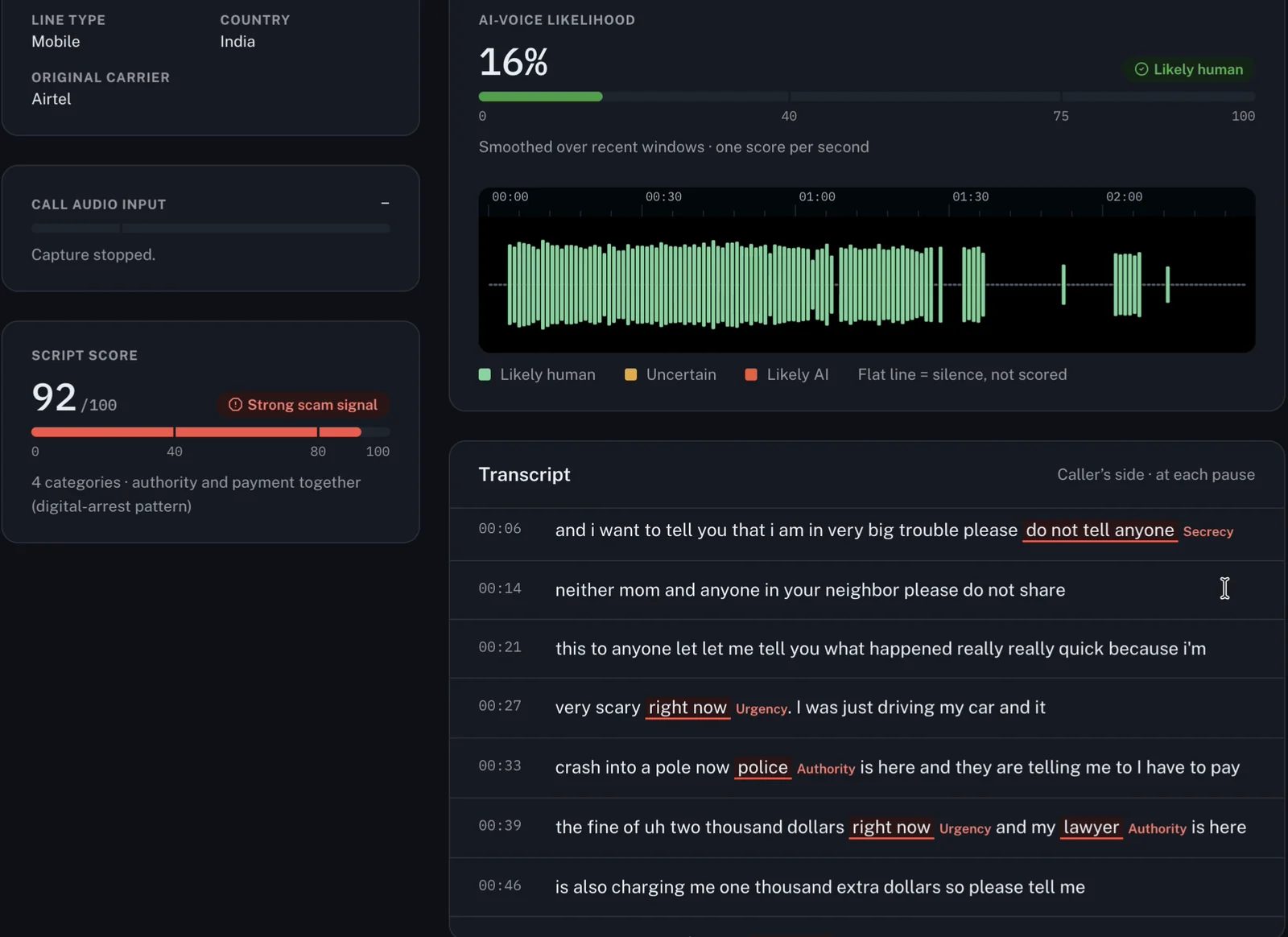
### The report: evidence, not a vibe
When the call ends, Veracity builds a JSON evidence report. It holds the call's times and how the audio was captured, the number check with every reason, each voice window it scored, and every red flag with the caller's exact words and the second they said them. On top sit the overall score, its top reasons, and next steps for where you live.
In India, that means calling 1930 and filing on cybercrime.gov.in if you lost money, or reporting the number on Chakshu if you didn't. When someone gets scammed, they often don't know what to put in the complaint. The report is that record, ready to attach.
Every report also says plainly that it's evidence, not proof: the AI-voice score is a model's estimate, and the transcript can have mistakes. If you turn on *Save call audio*, the report stores the recording's SHA-256 hash, so anyone can later check the file wasn't changed.
### How the code is organised
A few structural choices kept the build manageable under hackathon pressure:
- **Logic and web code live apart.** In the backend, `routes/` holds only web code, and `feature/` holds the logic with no FastAPI imports. Every feature can be tested without starting a server.
- **The live call runs on three threads.** The audio thread publishes sound levels, scores the voice every second and cuts chunks for Whisper. The transcriber thread runs Whisper and the rules. The LLM gets its own thread, so it can be slow without slowing anything else down.
- **Everything is an event.** Each result goes out over the WebSocket as a small event: `level`, `voice`, `transcript`, `flag`, `script`, `alert`, `report`. A dashboard that connects late still gets everything that already happened.
- **The dashboard has layers too.** `api/` knows the URLs and JSON shapes, `hooks/` holds the loading and error state, `pages/` and `components/` only draw. If the backend renames a field, only `api/` changes.
- **No phone? No problem.** With `VERA_FAKE=1`, the backend replays scripted sample calls through the same pipeline, so the dashboard can be built and demoed without a phone plugged in.
At BuildFest, Veracity had 13 automated tests. Today it has 134, and they run without a phone, the models or a PayPal account.
### From a warning to the money: the PayPal AI Hackathon
After BuildFest, one thing kept bothering me. Veracity warns you during the call, but the money still moves wherever you send it. Phone apps warn you about calls, and payment apps warn you about payments, but nothing connects the two.
So I've taken Veracity into the **PayPal AI Hackathon**, and built that connection: **Protected Send**.
You approve the payment in PayPal as usual, but the order's intent is `AUTHORIZE`. PayPal reserves the money, and nothing is sent yet. Veracity's payment gate then reads the call's risk at that moment, checking these rows from top to bottom:
| When PayPal authorizes, the call… | The money |
| --- | --- |
| is high risk, has a *Likely AI* voice, or matches a known scam script | **Held as a likely scam.** Released only after you call the person back on the number saved in your phone, and then only after a 15-minute cooling-off |
| is still going on | **Held** until it ends, then decided again with the final report |
| is medium risk, or the caller says they're family and asks for money | **Held until you call them back.** "They confirmed" releases it; "they didn't ask" cancels it |
| is low risk | **Released:** PayPal captures the payment |
| (nobody decides within 72 hours) | **Cancelled** automatically |
You can't press "they confirmed" while the call is still on, because the caller could be the one telling you to. Under the hood, it's PayPal's Orders and Payments APIs (authorize, then capture or void), with every money-moving request made idempotent and every PayPal response logged on the payment for audit.
Most of PayPal's users are outside India, so this version also knows the scams they get: the "Grandma, it's me" call, the fake lawyer asking for bail money, and the US places to report them (the FTC, the FBI's IC3 and the Elder Fraud Hotline).
On 6 November we tested it on two real phone calls, in the PayPal sandbox with test money. The same tester made both calls, from the same phone, in the same voice. Only the words changed:
| | A fake grandson | The real grandson |
| --- | --- | --- |
| What he said | A car crash, a police fine, a lawyer, "do not tell anyone" | Short on money for Mom's birthday cake |
| Call risk | **92 / 100**, high | **15 / 100**, low |
| The money | $3,000 held, then voided after the callback | $50 held during the call, released when it ended |
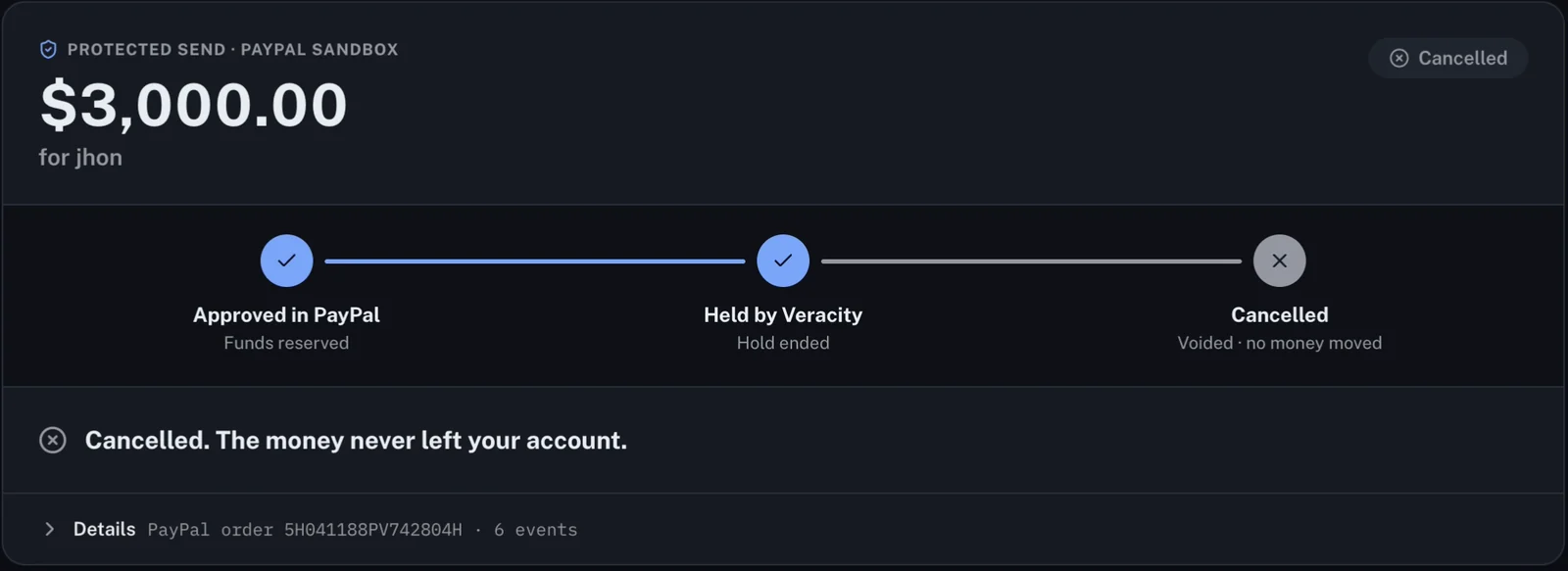
That second call matters as much as the first. A tool that blocks your real grandson is a tool you uninstall.
Judges can run the whole thing in Docker, either replaying sample calls or uploading their own recording through the real models. I'll share how the hackathon goes once the results are out.
### What it can't do yet
I'd rather you hear the limits from me than find them yourself:
- **A cloned voice played from a speaker across a room is mostly missed.** The room's echo hides it.
- **It needs a laptop and a USB cable,** and call-audio support varies from phone to phone.
- **Money has to go through Protected Send.** Veracity can't pause a payment made inside the PayPal app or anywhere else.
- **It can't unmask a spoofed number.** It checks the caller ID the network shows.
- **The evidence is still small:** a handful of real calls, plus 48 written test calls for the scam rules.
### Coming in Part 3
Part 3 is the one I promised you at the end of Part 1: what building Veracity taught me. It covers what changes when you build a real product instead of a tutorial project, how I actually used AI coding assistants to build it (and why you still have to understand every line you ship), and the mistakes I'd avoid at my next hackathon.
Until then, the code is open. [Veracity is on my GitHub](https://github.com/YADUNANDAN-SINGH/Veracity), and there's a [demo video](https://youtu.be/7DbctZZKWP8) if you want to see it catch a call.
And if you haven't read it yet, [Part 1](https://yadunandan-singh.pages.dev/blog/first-hackathon-scam-call-detector) is the story of the 30 hours where it all started.
---
## 30 Hours, One Laptop, and a Scam-Call Detector
- Author: Yadunandan Singh (https://yadunandan-singh.pages.dev/)
- Published: 2026-11-01 · updated 2026-11-08
- URL: https://yadunandan-singh.pages.dev/blog/first-hackathon-scam-call-detector/
- Topics: Hackathon, Cybersecurity, Deepfake Detection
- First published on Medium: https://medium.com/@yadunandan-ai-dev/30-hours-one-laptop-and-a-scam-call-detector-e915bce8dbb9
Summary: Yadunandan Singh recounts his first hackathon, CT BuildFest 2.0 in Jalandhar, where Veracity, which he coded over 30 hours for his six-member team Coffee to Code, won second place. During a live call, Veracity checks the caller's number, how likely the voice is AI-generated (wav2vec2) and the words (Whisper plus Llama 3.1 run locally) for scam patterns in English, Hindi and Hinglish, warns the user mid-call and builds an evidence report for the 1930 helpline. Part 1 of 2: the build, the mentors' evaluation and lessons on teamwork.
Key takeaways:
- Veracity checks the caller's number, the voice and the words at once, and warns you while you're still on the call.
- Everything runs locally, so a call never leaves your own machine.
- An evidence report for the 1930 helpline or cybercrime.gov.in makes a scam something a victim can report.
- You don't have to write the code to be the reason the code gets written.
- Carrying the whole build alone is a weakness; hand work off early.
Imagine your phone rings and it's your brother's voice. He sounds panicked, he's in trouble, and he needs money right now. Except it isn't him. It's an AI clone of his voice, made from a few seconds of audio he once posted online.
Calls like this are hitting more and more families in India, and in the middle of a call, almost nobody can tell a real voice from a fake one. That was the problem I took to my first-ever hackathon, CT BuildFest 2.0 at my college in Jalandhar.
The project was **Veracity**, a tool that listens to a live call and tells you whether the voice on the other end is real. I spent the 30 hours of the event coding, breaking and fixing it. This is the story of those 30 hours, and what they taught me about building real products.
### What Veracity does
Veracity sits between you and a suspicious call and runs three checks at the same time:
1. **Who is calling?** It looks at the caller's number and checks it against public data for warning signs.
2. **Is the voice real?** It listens to the call live and shows a percentage: how likely it is that the voice is AI-generated.
3. **What are they saying?** It watches the conversation for classic scam patterns, like panic, secrecy and sudden requests for money, in English, Hindi and Hinglish.
The three checks combine into a single risk score. If the call looks like a scam, Veracity warns you while you're still on the line, not after the money is gone.
For the technically curious: a wav2vec2 deepfake model scores the voice every second, Whisper transcribes the call, and a set of scam rules plus Llama 3.1, running locally through Ollama, read the transcript. A FastAPI backend streams all of it to a React dashboard.
Two decisions mattered most to me. First, everything runs locally on your own machine, so your calls never get uploaded anywhere. Second, Veracity creates an evidence report you can attach to a complaint on the national cybercrime helpline (1930) or cybercrime.gov.in. When someone gets scammed, they often don't know what to put in that complaint. Veracity hands them a ready record.
### Six people, one laptop, 30 hours
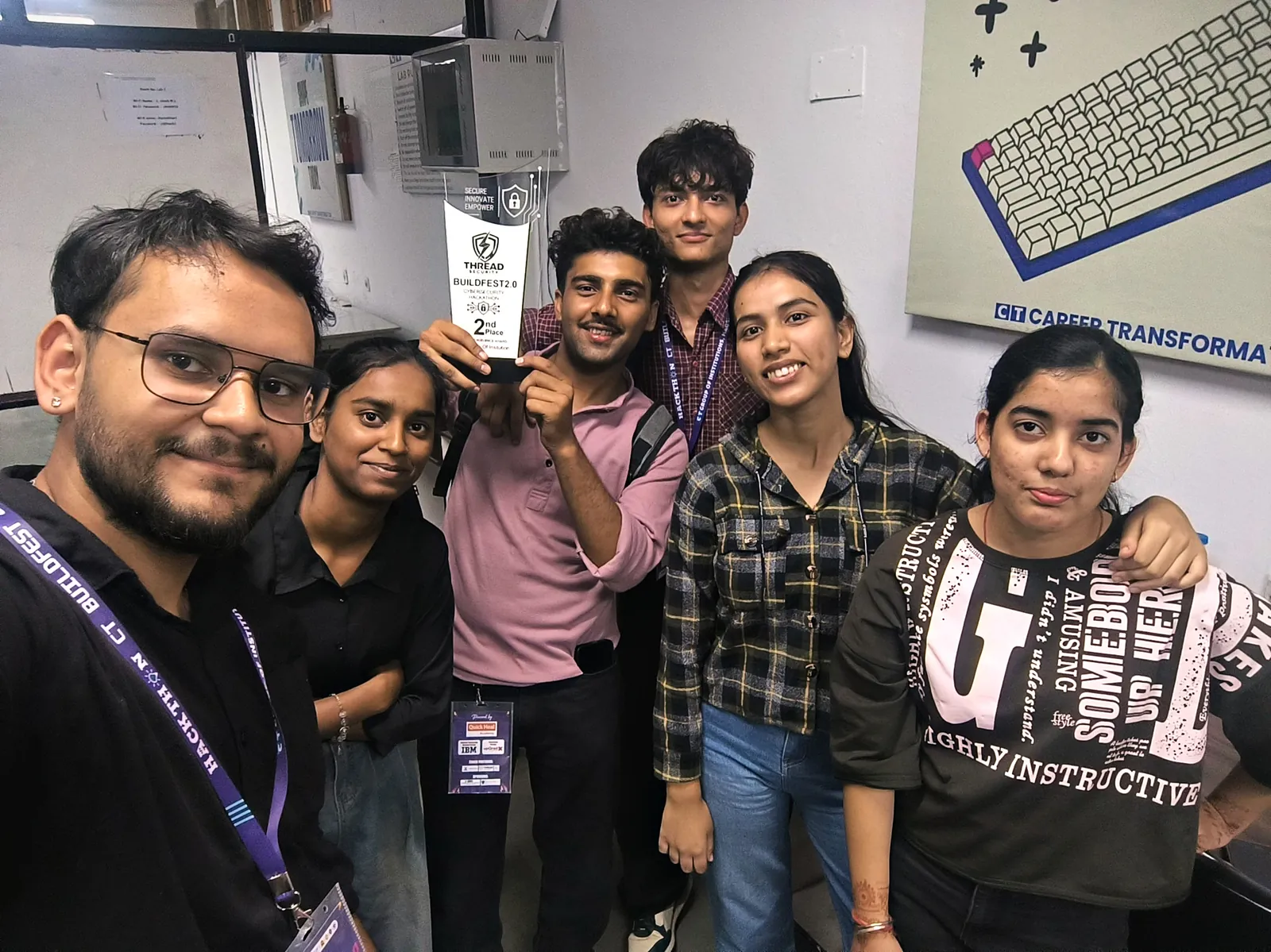
Our team, Coffee to Code, had six members. Srishti led the team, with Muskan and Ananya from 5th semester, and Shantnu, Shubham and me from 1st semester.
I wrote Veracity's code, so for 30 hours that laptop barely left my hands.
Written like that, it sounds like a solo story. It wasn't. Somewhere in the middle of the night, the stress caught up with me. Every time it did, my teammates calmed me down and kept talking to me so I could keep going. I honestly don't know if I'd have made it to morning without them.
That's the first thing this hackathon taught me: you don't have to write the code to be the reason the code gets written.
Looking back, carrying the whole build alone was also a weakness. My team could have done much more if I'd handed work off early, and that's one of the mistakes I'll unpack in Part 3.
### The evaluation
When the mentors reached our table, I walked them through Veracity myself, from the problem to the live demo. Then the counter-questions started. They went from deep technical details all the way to how an ordinary person would actually use it.
At one point they wanted to see more of my work, so we scrolled through my GitHub profile together.
The feedback I'll remember most came at the end: the mentors told me Veracity could seriously be expanded into a real business. At my first hackathon, hearing that meant a lot.
### Second place, and what I'm taking home
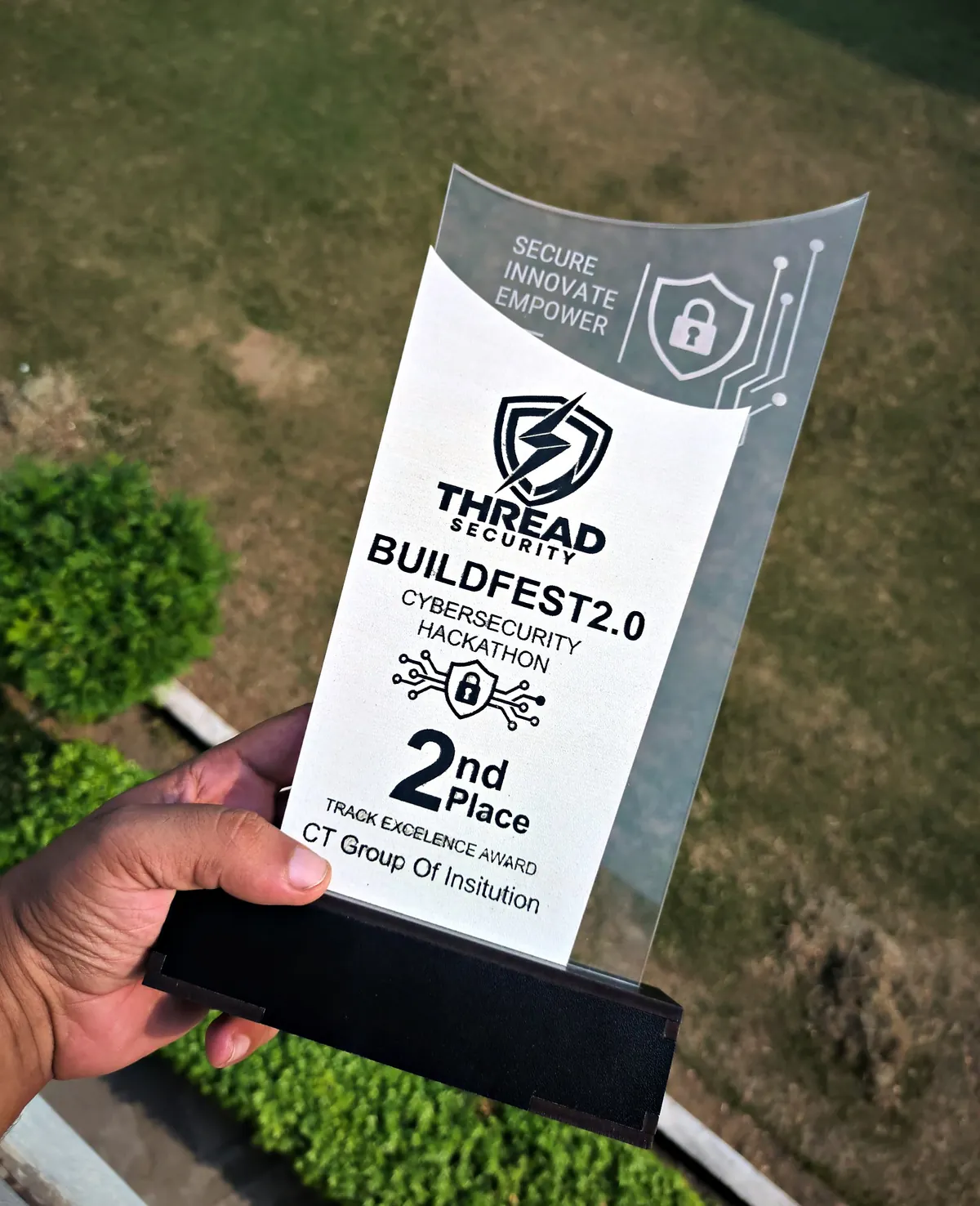
Veracity won second place. As a first-semester student at my first hackathon, I'm proud of that. I won't pretend I'm fully satisfied, though. I came for first, and that hunger is coming with me to the next one.
Srishti, our team lead, went up on stage to accept the trophy. When she came back down, she handed it to me and said I deserved it. That one gesture says a lot about the kind of leader she is.
But the trophy isn't the main thing I'm taking home. Two lessons are.
**I learned what working on an actual product feels like.** Tutorials and side projects give you clean problems. A product gives you a real user, a hard deadline, a demo that has to work in front of people, and questions you can't predict. Every decision suddenly had a cost: what to build, what to cut, what might break on stage.
**I got a real sense of how AI is used in actual development.** It's easy to put "AI-powered" on a slide. It's a completely different thing to make AI work inside a live, messy situation like a real phone call, where it has to be fast, right, and useful to someone who isn't technical. Building Veracity under pressure showed me where AI genuinely helps, where it falls short, and why you still have to understand everything you ship.
### Read Part 2
Part 2 is up: [Three Signals, One Verdict, and a Payment That Waits](https://yadunandan-singh.pages.dev/blog/veracity-scam-call-detector-architecture). It covers why Veracity exists, how it works, and what I built on top of it for the PayPal AI Hackathon. The lessons and mistakes I promised here have moved to Part 3.
If you want to see the project, [Veracity is on my GitHub](https://github.com/YADUNANDAN-SINGH/Veracity).
And if you're a first-year wondering whether you're ready for a hackathon: you are. Go to one.
---
## I Used AI to Predict My University Exam Paper, So I Turned It Into an Open-Source Claude Skill
- Author: Yadunandan Singh (https://yadunandan-singh.pages.dev/)
- Published: 2026-10-26 · updated 2026-10-26
- URL: https://yadunandan-singh.pages.dev/blog/exam-paper-predictor/
- Topics: Claude, Open Source, Learning
- First published on Medium: https://medium.com/@yadunandan-ai-dev
Summary: Yadunandan Singh describes how a last-minute hostel experiment with previous year question papers (PYQs) and Claude produced a mock exam that overlapped the real paper by roughly 90%. He packaged the workflow into exam-paper-predictor, a free, open-source Claude skill for university, board, entrance and professional exams in any country or language. The skill collects 5 to 20 years of past papers, maps section and topic weightage, backtests its own predictions on held-out past years before generating a mock paper, exports ready-to-use PDFs (mock paper, solutions and important topics), and scores its prediction against the real paper afterwards.
Key takeaways:
- University exams follow repeatable patterns in topic weightage, question styles and marks distribution across years.
- Feeding real past papers (even a phone photo of an old paper) to Claude turns hours of manual PYQ filtering into a focused revision plan and mock paper.
- exam-paper-predictor is a free, open-source Claude skill for university, school board, entrance and professional exams in any language.
- Before predicting an upcoming paper, the skill backtests itself on held-out past years and grades its prediction against the real paper afterwards.
- Use predictions to prioritise high-weightage topics and timed mock practice, not as an excuse to skip the rest of the syllabus.
I live in a hostel while pursuing my bachelor's degree in AI and ML.
If you've ever lived in a college hostel, you already know how the semester goes. On normal days, almost nobody studies. There are late-night conversations, cricket in the corridor, gym sessions and random trips for chai at midnight. Books stay closed.
Then the exam date sheet comes out, and the whole hostel turns into a library overnight.
The real problem with last-minute exam preparation is simple: there is never enough time to study everything. The syllabus is huge, the first paper is a few days away, and you're left with one question:
> *What is actually important, and what can I safely skip?*
Normally, answering that question is a project of its own. You have to comb through the syllabus, ask seniors, dig up previous year question papers (PYQs), and figure out which topics keep repeating. By the time you finish filtering, you've spent the very hours you were trying to save.
So I tried something different. I gave the filtering job to AI.
### Step 1: Using AI to find the most important topics
I started small. With a few structured prompts, I asked Claude to go through my syllabus and give me:
- a list of the most important topics for each unit,
- the most expected questions across the syllabus, and
- a clean important-questions PDF I could revise from.
This alone changed how I prepared before exams. Instead of reading every page of every chapter in order, I had a focused list to start from. I wasn't guessing any more: I had a revision plan.
Still, that wasn't the part that surprised me.
### Step 2: The night it matched the real paper
One night before an exam, I borrowed an old university question paper from a senior, took a photo of it on my phone, and shared the image with Claude.
I asked it to study the pattern (the sections, the marks distribution, the types of questions, and which units carried the most weight) and generate a full mock paper for my upcoming exam.
Then the real exam happened.
When I compared the mock paper with the actual question paper, the overlap was around **90–95%**. Not word for word, of course, but the same topics, the same question styles and the same weightage. Questions I had practised the night before were sitting right there in the exam hall.
I want to be honest here: this was my experience on my papers, and one strong result is not proof that it works every time. Syllabuses change, examiners change, and some papers are deliberately unpredictable. Still, it worked well enough that I couldn't stop thinking about one question:
> *Why should only I have this?*
Every student in every hostel faces the same exam-night problem. So I decided to package the whole workflow into something anyone could use.
### Introducing exam-paper-predictor: an open-source Claude skill
[exam-paper-predictor](https://github.com/YADUNANDAN-SINGH/exam-paper-predictor) is a free, open-source Claude skill that predicts an upcoming exam paper from real past papers.
I didn't build it only for my university. It's designed to be universal, and works across:
- **University and college exams:** semester, midterm, end-semester, finals and resits
- **School board exams**
- **Entrance and competitive exams**
- **Professional and licensing exams**
It works in any country and in any language.
#### What the skill actually does
Here is the full workflow from input to post-exam grading:
```text
1. Collect past papers 5–20 years of PYQs (found automatically or uploaded, including photos)
2. Map the exam pattern sections, marks, question types, chapter and topic weightage
3. Backtest on past years hold out a past paper, predict it from earlier years, score the match
4. Generate the PDFs mock question paper, full solutions, and high-weightage revision sheet
5. Grade the prediction compare against the real paper once the exam is over
```
**1. Collects past papers.** It searches for 5 to 20 years of previous year question papers on its own, or works with the ones you hand it, including a phone photo of a senior's old paper.
**2. Maps the exam pattern.** It breaks down sections, marks distribution, question types, and both topic-wise and chapter-wise weightage across the years.
**3. Backtests its own predictions.** This is the part I'm most proud of. Before predicting your upcoming exam, the skill tests itself on past years: *"If I only had the papers before 2023, how well would I have predicted the 2023 paper?"* You see how reliable the pattern is on real held-out papers before you trust it for your own revision.
**4. Generates ready-to-use PDFs.** In one run, it produces:
- mock question paper PDFs laid out in the real exam format,
- separate step-by-step solutions PDFs, and
- an important-topics PDF for quick revision.
**5. Scores itself after the exam.** Once the real paper is out, you can feed it back to the skill and it will grade how accurate its prediction was. That last step matters: a tool that predicts exams should be willing to be graded too.
### Why past papers work so well with AI
There is nothing magical going on here. University exams aren't random.
Most question papers are set by a small committee of examiners following a fixed syllabus and a fixed marking scheme. Over five or ten years, clear patterns form:
- some topics appear almost every single year,
- numerical and derivation questions return with only the numbers or framing changed, and
- marks are distributed across units in a fairly consistent way.
Humans spot these patterns too: that's what toppers and helpful seniors have always done. The difference is time. It takes a person hours or days to cross-reference ten years of papers carefully. AI can do that analysis in minutes, then turn the distribution into a realistic mock paper with complete solutions.
In other words, **AI isn't replacing studying. It's replacing the filtering:** the part that eats your evening before you even open the book.
### How to use it
The skill is open source on GitHub: [YADUNANDAN-SINGH/exam-paper-predictor](https://github.com/YADUNANDAN-SINGH/exam-paper-predictor).
Add it as a skill in Claude (the repository's README walks through the setup step by step), then ask in plain language:
```prompt
Here are the last 5 years of my Data Structures end-semester papers. Predict this year's paper and give me a mock paper, solutions and the important topics.
```
Or, if you don't have the past papers on hand:
```prompt
What are the most important topics for my Class 12 physics board exam?
```
The more real past papers you give it, the sharper the weightage map and the mock paper become.
### A word of advice, from one student to another
Please don't use this as an excuse to study only five questions.
Use it the way I do:
1. **Cover the high-weightage topics first**, so the most likely marks are secure even if you're short on time.
2. **Practise the generated mock paper under real exam timing**, without looking at the solutions PDF.
3. **Go back to the rest of the syllabus** with whatever time remains.
Predictions can miss. Understanding the subject never does. That's the same principle I wrote about in [Stop Vibe Coding](https://yadunandan-singh.pages.dev/blog/stop-vibe-coding/): AI is at its best when it sharpens your preparation, not when you hand your thinking over to it.
### What's next
My own December end-semester exams are coming up, and I'm going to use them as a clean, public test: generate the prediction before the exam, publish it, and score it honestly against the real paper afterwards. I'll share the results whether they're great or humbling.
If this sounds useful for your own exams:
- **Star the repository on [GitHub](https://github.com/YADUNANDAN-SINGH/exam-paper-predictor):** it genuinely helps other students find it.
- **Try it on your next exam** and let me know how closely it matched.
- **Contribute:** open an issue or a pull request if you want to improve the prompts, formatting or board-specific rules for your university.
Every hostel has that one night before the exam where the whole corridor panics together. I can't take away the panic, but I hope this gives you back a few hours. If you test it on an upcoming paper, I'd love to hear how it did on [LinkedIn](https://www.linkedin.com/in/yadunandan-singh-ai-dev/).
---
## How to Find Your First Open-Source Project in One Evening
- Author: Yadunandan Singh (https://yadunandan-singh.pages.dev/)
- Published: 2026-07-24 · updated 2026-10-19
- URL: https://yadunandan-singh.pages.dev/blog/find-your-first-open-source-project/
- Topics: Open Source, GitHub, Career
- First published on Medium: https://medium.com/@yadunandan-ai-dev/how-to-find-your-first-open-source-project-in-one-evening-ab936a19d9dd
Summary: Yadunandan Singh explains the method he used to go from never having opened a pull request to eight merged pull requests in the c2siorg organisation (DataLoom and TensorMap) within forty days. Answer three questions on paper (your strongest language, your domain and your realistic weekly hours), turn them into one targeted AI search prompt, then spend 90 seconds vetting each suggested repository. The second half is an honest, step-by-step account of a first pull request, from local setup to review and merge.
Key takeaways:
- Decide your language, domain and realistic weekly hours on paper before you search GitHub.
- Turn those answers into one specific search prompt: at least 50 stars, your stack, actively accepting contributors.
- Vet each repository in 90 seconds: a commit in the last 30 days, reviews within a week, a real CONTRIBUTING.md and a welcoming tone in the issues.
- Start with small fixes; showing up consistently matters more than skill on day one.
- Review delays are normal: never wait idle, and ping politely once after a week.
I'm 18. Forty days before I wrote the first version of this post, I had never opened a pull request. By the time I published it, I had eight merged across two projects in the [c2siorg](https://github.com/c2siorg) organisation.
None of that came from being unusually talented. It came from a method for the part nobody teaches: choosing *where* to contribute. This post is that method, followed by an honest, step-by-step account of what a first pull request actually feels like.
### The one line that sent me to GitHub at midnight
I was half-watching a YouTube video when someone said that open source can completely change how you think about software engineering. I don't remember the channel or the video. I remember the line.
I didn't announce anything. No "Day 1 of my open-source journey" post, no telling friends. I just wanted to find out whether it was true.
There was another reason, and I'd rather be honest about it because everyone has it: contributing to open source carries status. Every class has one person who works on real projects, and once people find out, it's all they talk about. That's a nice side effect. It isn't a reason. A reason has to survive week three, when you're reading 4,000 lines of someone else's code at 1 a.m. and none of it makes sense. Curiosity survives that. Status doesn't.
### The hard part isn't contributing. It's choosing.
Every tutorial says "start contributing to open source." Almost none of them say where.
So you search GitHub for "good first issue" and run straight into the real beginner problem: hundreds of millions of repositories, issues that were claimed eight months ago and never closed, projects whose last commit was in 2021, and maintainers who never reply. You bounce between five repositories in one evening and contribute to none of them.
That's exactly where I was. Here's what got me out.
### Step 1: Answer three questions on paper
Before you open GitHub, get a notebook and a pen and write the answers down. Typing them isn't the same, and you'll need them in Step 2.
1. **Which language am I genuinely good at?** Not learning. Not "did a course in." Good at. If you can't debug in it without looking up the syntax, it doesn't go on the list.
2. **If I had to build one polished project from scratch, what would it be, and in what stack?** This question quietly tells you your domain. If your answer involves dataframes and model training, your repository lives in the ML-tooling world. If it involves routes and authentication, it lives somewhere else entirely. Write the frameworks and libraries down by name.
3. **How many hours a week can I realistically give this, for three months rather than one excited weekend?** Be brutal. Six hours you actually keep beats forty hours that disappear after ten days. Maintainers notice who comes back. Consistency is the real currency of open source, and it's the one thing you can offer on day one that has nothing to do with skill.
### Step 2: Turn your answers into one search prompt
Now open an AI assistant (Copilot, ChatGPT and Claude all work the same here) and paste this in, filling the brackets with what you just wrote:
```prompt
I'm looking for an open-source organisation to contribute to. Find projects that meet all of these criteria: at least 50 stars, well regarded in [your field], built in [your language], using frameworks or libraries like [your frameworks], and actively accepting new contributors. For each one, tell me the last commit date and how quickly recent pull requests were reviewed.
```
This is almost exactly what I typed:
```prompt
I'm looking for an open-source organisation to contribute to. Find projects that meet all of these criteria: at least 50 stars, well regarded in the data/ML space, built in Python or Rust, using frameworks or libraries like pandas, TensorFlow or scikit-learn, and actively accepting new contributors.
```
Without the three answers from Step 1, that prompt is empty. That's why the notebook comes first.
### Step 3: Spend 90 seconds verifying each suggestion
Don't trust the list blindly. The model will hand you ten repositories and some of them will be dead. Open each one and check four things:
- **Last commit:** within the past 30 days. Any older and you'll wait forever for a review.
- **Open pull requests:** are recent ones getting comments within a week? Open two and read the review threads.
- **A `CONTRIBUTING.md` that actually exists** and explains how to run the project locally.
- **The tone in the issues:** read three issue threads. Within a minute you'll know whether beginners get helped or ignored.
That last check matters more than the star count, and almost nobody tells you so.
### Why I picked DataLoom
I ended up at [DataLoom](https://github.com/c2siorg/DataLoom), a data-cleaning and transformation tool in the c2siorg organisation. It passed all four checks, it sat exactly in the domain I'd written on paper, and it was small enough that I could eventually hold most of it in my head. For a first project, that matters far more than prestige.
My first contribution went in on 15 June 2026. Forty days later I had eight merged pull requests across DataLoom and its sibling project, [TensorMap](https://github.com/c2siorg/tensormap).
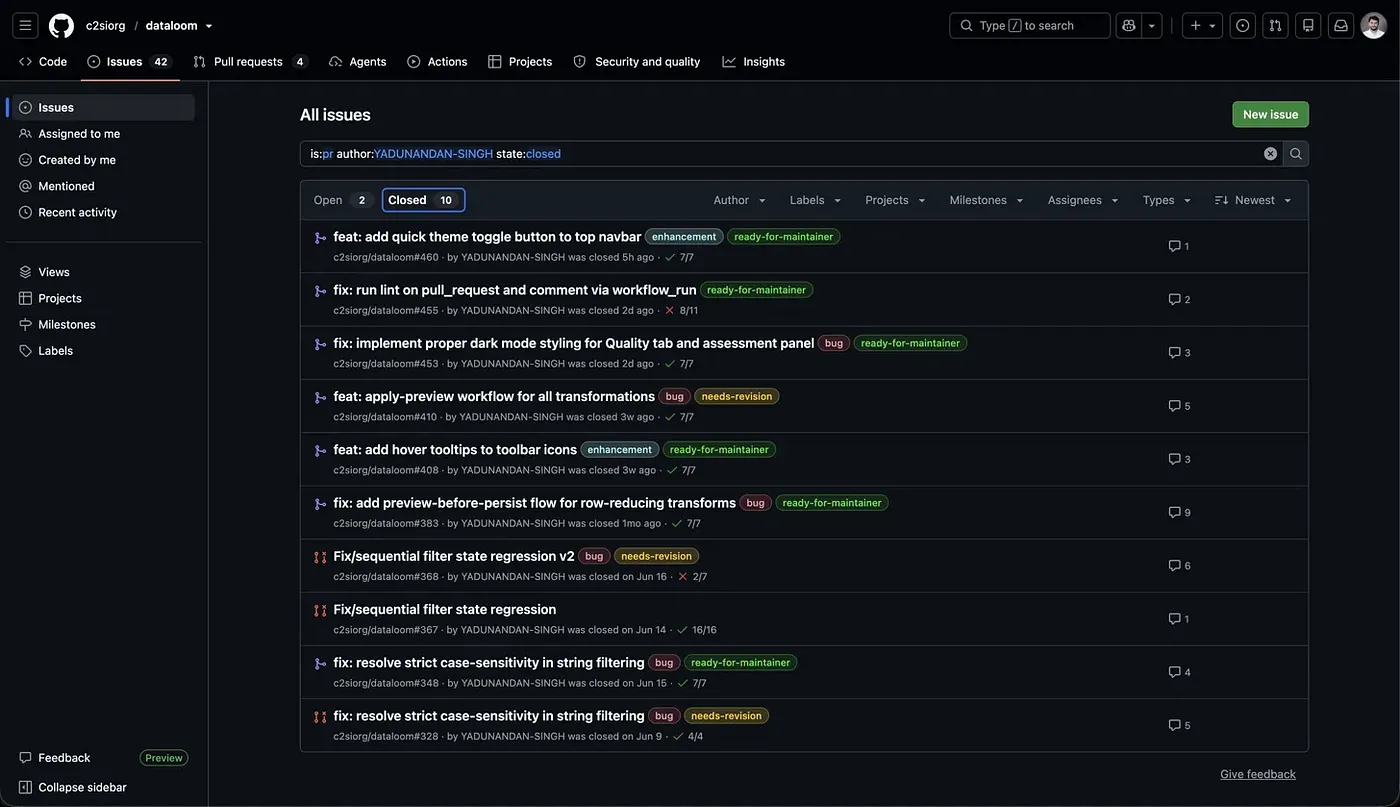
None of it was glamorous at first. A case-sensitivity bug in string filtering. Hover tooltips on toolbar icons. A dark-mode panel that was still using hard-coded light-theme classes. Then bigger things: a preview-before-apply flow rolled out across all twelve transformation forms, and a CI change that split the lint workflow so untrusted pull-request code no longer runs with write permissions.
You don't start at the CI security fix. You start at the tooltip. That's the whole point.
### What your first pull request actually feels like
This is the part I wish someone had walked me through, one moment at a time.
**You open the repository and feel like the least qualified person alive.** Everyone else's pull requests look surgical. The issue titles are full of acronyms you've never seen. That feeling is not a signal. Everyone on the contributors list felt it, and most of them still do on a new codebase.
**You fork it, clone it, and try to run it locally.** This alone can eat your first evening. Mine involved Docker Compose, a Postgres container and a missing environment variable that took an hour to find. When it finally boots, that's your first real win, and it's bigger than it feels.
**You find a bug.** A small one, but a real one. You open an issue and write, "Can I work on this?"
**Someone replies: "Go ahead, it's yours."** This is the moment everything turns. A stranger with commit rights on a project you admire has just handed you a piece of it, in public, with your username attached. That isn't encouragement. It's permission, and it feels heavier.
**You write the fix in forty minutes and spend three hours on the commit message.** Then you press "Create pull request" with a million thoughts in your head, most of them about how it'll look when they reject it.
**Then: nothing.** Hours. Sometimes days. This is the stage that breaks people, so read the next section before it happens to you.
**Then a comment: "needs revision."** You'll read it as rejection. It isn't. A maintainer spent part of their evening reading code from someone they've never met, and cared enough to tell you how to make it better. It's the most under-appreciated gift in the whole ecosystem. You push a fix in ten minutes and start waiting again.
**Then the icon turns purple. Merged.**
Code you wrote on your laptop, in your room, while doubting every line, is now running on the machines of people who will never know your name. I won't try to name that feeling. Go and get it.
### The waiting is normal
Maintainers are volunteers with jobs, degrees, families and a review queue. A few hours to a few days is completely normal, and silence is almost never about you. Two rules fixed this for me:
1. **Never wait idle.** The moment a pull request goes up, start on the next issue. If you're always a few issues deep, review latency stops being emotionally expensive.
2. **Ping once, politely, after a week.** "Hi, just checking whether this needs anything from my side." That's the whole message.
### Nobody judged me
The biggest fear every new contributor carries is looking stupid in public, and it's the permanent, searchable, screenshot-able kind of public.
Here's what actually happened. I asked beginner questions and got real answers. I proposed a feature, another contributor pushed back with a better-reasoned design, and I changed direction, without a trace of condescension anywhere in the thread. Before the forty days were up, I reviewed someone else's pull request for the first time and raised two issues with the approach. They fixed one immediately and recorded the other as a follow-up.
That isn't luck. It's what a healthy project looks like, and it's exactly what you're screening for when you read those issue threads in Step 3. The person who wrote "go ahead" on my first issue and the maintainer who merged my first pull request have no idea they did anything. They did everything.
### So, has open source changed my life?
Honestly, I don't know yet, and I'm not going to pretend otherwise. But here's what I can measure:
- I can read a large codebase I didn't write and find my way around it.
- I can take a review comment without my ego getting involved.
- I've been wrong in public, in writing, in front of better engineers, and nothing bad happened.
- I have a public record of real work, which at 18 and without a computer-science degree is worth more than another certificate.
That isn't "life-changing" yet. It's a lot more than I had in May.
### Your turn
Do Step 1 tonight: three questions, on paper. By the end of the evening you'll have a repository, and not long after, a first pull request.
If this is the post that gets you there, I'd genuinely like to hear about it: which repository you picked, and what that first "merged" notification felt like. [Send me an email](mailto:yadunandansingh027@gmail.com) or message me on [LinkedIn](https://www.linkedin.com/in/yadunandan-singh-ai-dev/).
---
## ChatGPT Failed My Sister’s Live Class, So I Built a Neuro-Symbolic Math Solver
- Author: Yadunandan Singh (https://yadunandan-singh.pages.dev/)
- Published: 2026-05-30 · updated 2026-10-19
- URL: https://yadunandan-singh.pages.dev/blog/neuro-symbolic-math-solver/
- Topics: Machine Learning, Computer Vision, Neuro-Symbolic AI
- First published on Medium: https://medium.com/@yadunandan-ai-dev/chatgpt-failed-my-sisters-live-class-so-i-built-a-neuro-symbolic-ai-math-solver-from-scratch-38a809494b67
Summary: After watching ChatGPT answer a simple numerical with an essay during his sister's live physics class, Yadunandan Singh built a neuro-symbolic math solver. A React canvas sends a handwritten equation to a FastAPI backend, which normalises the image's polarity, segments each symbol with OpenCV, classifies it with a CNN trained from scratch on MNIST plus 24,000 synthetic operator images, and evaluates the expression deterministically, so the answer is exact rather than generated.
Key takeaways:
- Use a neural network for the fuzzy part (reading handwriting) and deterministic code for the exact part (the arithmetic).
- Normalise image polarity by mean brightness so every input becomes white symbols on a black background.
- Segment symbols with OpenCV external contours, drop specks under 50 px² and sort the boxes left to right.
- A 14-class CNN trained on MNIST plus synthetic operators passed 99% training accuracy in ten epochs.
- The MVP handles single-line arithmetic; multi-line problems and calculus are the next step.
Somewhere on the internet I once read: *"You can make almost anything, as long as you can turn raw data into numbers."* Most of my projects are some version of that idea, and this one is no different. What makes it worth writing about is where it came from, and why the most important design decision was to keep a large language model out of it.
### The problem: generative AI under pressure
I was sitting with my elder sister, an online teacher, while she took a live physics class for twenty students. She was close to the end of the lesson and needed to get through one last numerical before time ran out.
When we're in a hurry, our brains sometimes switch into lazy mode. She went blank halfway through the calculation. In a panic she started typing the problem into ChatGPT, then uploaded a photo of it, hoping for a quick answer.
It went the wrong way. The chatbot dug too deep: it over-explained the theory, hallucinated along the way, and produced a long, polished essay when all she needed was one hard number.
That's when it clicked for me. **Sometimes we don't need a long, polished answer. We need a precise one.** She wasn't trying to learn a new concept; she was confirming steps she already knew.
So I built the [Neuro-Symbolic Math Solver](https://github.com/YADUNANDAN-SINGH/Neuro-Symbolic-Solver): a lightweight web app where you draw an equation or upload a photo of one, and get back the exact answer. No essays. No hallucinations.
### How it works, end to end
Before the details, here's the whole pipeline in one place:
```text
draw or upload → base64 image → FastAPI
1. normalise polarity (white symbols on black, always)
2. segment characters (OpenCV contours, left to right)
3. classify each one (CNN trained from scratch, 14 classes)
4. evaluate exactly ("12+34" → 46)
5. return JSON → React shows the answer
```
The neural network handles the part that is genuinely fuzzy: reading messy handwriting. Plain, deterministic code handles the part that must be exact: the arithmetic. That split is what "neuro-symbolic" means here.
### Phase 1: A frictionless frontend (React and Vite)
The goal was to capture an equation with as little friction as possible. I chose React with Vite for speed and had my coding agent (Antigravity) scaffold the interface from this prompt:
```prompt
Design a frontend website interacting with the user. Features: the goal is a frictionless user experience. Tech stack: React JS, Google Fonts. Component 1: a drag-and-drop upload zone, plus an HTML5